Field Service Automation: What It Is and When to Skip It

Your dispatcher is on the phone, two crews sit idle, a customer wants an ETA, and yesterday's tickets are still in a truck cab.
Field service automation passes each job from request to crew to invoice on its own, so that scramble never starts. Below, we break down how these platforms handle scheduling, dispatch, and billing, where they fall down, and how to tell whether they fit the way you run jobs.
What Is Field Service Automation?
Field service automation uses connected tools to move field work forward without manual handoffs, covering job intake, scheduling, dispatch, mobile data capture, and invoicing.
One system holds the job record and pushes it to the next stage on its own, so nobody retypes the same address, price, or set of notes into a second tool.
The bottom line: field service automation removes the phone tag, the paper tickets, and the double entry between a customer request and a paid invoice. That one change is where optimizing field operations starts.
Key features that define field service automation
Seven capabilities do most of the work in this category, starting with dispatch.
Automated scheduling and dispatch builds each day from rules you set around availability, skill, and location, and route optimization orders the stops so crews spend less time driving.
The real test arrives at 6 a.m. when someone calls out, and three jobs need reshuffling before the yard clears, which is where the better dispatch tools for contractors separate themselves from a shared calendar.
Beyond dispatch, the feature set clusters into six areas:
- Mobile work orders that put job details, site notes, and history on a phone or tablet
- Digital data capture for hours, quantities, photos, and signatures collected on site
- Automated customer messaging for confirmations, arrival windows, and completion notices
- Billing triggers that turn a closed job into an invoice without a second data-entry pass
- Inventory and materials tracking for parts on the truck or, on a paving job, the tons of mix and the trucks needed to haul it
- Reporting that compares what you estimated against what the crew actually used.
A solid workflow platform ties those six together. Buy them separately, and you inherit six logins, six exports, and a monthly reconciliation ritual nobody enjoys.
How Does Field Service Automation Work?
Field service automation works by treating the job as a single record that gains detail at every stage. A request comes in, the system creates the job, assigns it based on your rules, sends the details to a phone, collects what happened on site, and hands the numbers to billing.
Nobody rekeys anything, so a detail entered once stays right through to the invoice. Here's the sequence most platforms follow:
- Intake creates the job automatically. A web form, phone call, or recurring maintenance trigger generates a job record with the customer, address, and scope already attached.
- The system assigns the work using your rules. Crew skill, equipment, and drive time decide who gets the job, which is where crew scheduling tools settle the daily whiteboard argument.
- Details land on a phone, so the assigned crew sees the site, the scope, the materials, and any history from the last visit.
- The field captures data as work happens, which puts hours, quantities, photos, and customer signatures into the record on site while the details are fresh.
- Billing starts at completion, and captured quantities flow straight into an invoice that shortens the gap between finishing work and getting paid.
- Reporting closes the loop by dropping actual costs next to your estimate, so you price the next one with real numbers.
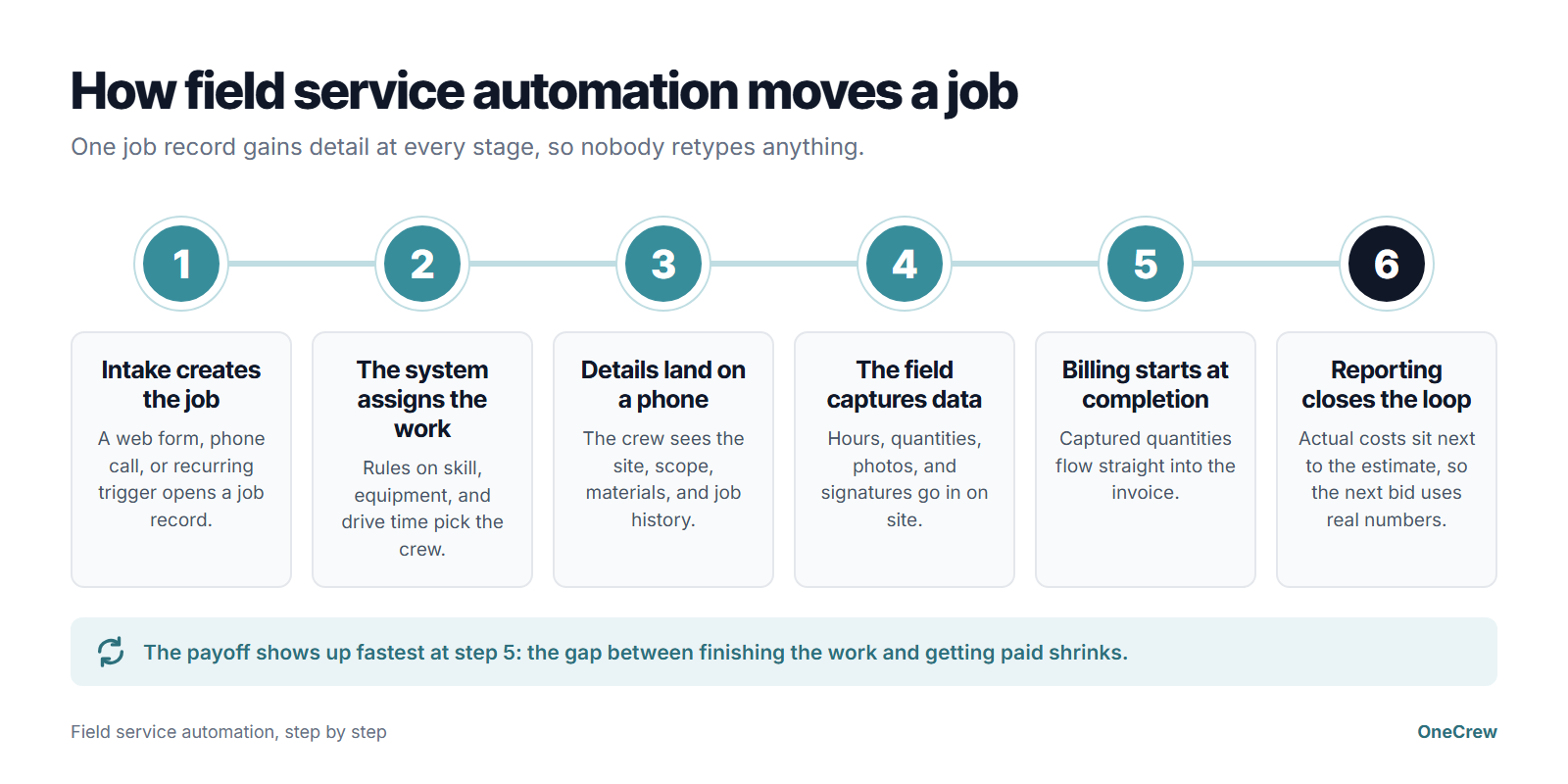
The payoff shows up fastest in step five. In Rabbet's 2025 survey of U.S. contractors, respondents tied slow payment to an estimated 14% of total project costs.
Cutting even a few days out of that cycle changes how your month feels, which is the whole argument for a cleaner invoicing workflow.
Picture a plumbing outfit running eight service calls a day. Before automation, the office phones each customer, texts the crew an address, waits on a paper ticket, and bills four days later.
After automation, the customer gets an arrival window by text, the crew closes the ticket on a phone with photos attached, and the invoice goes out that afternoon. Same eight jobs, four fewer days of float on the shop's cash flow.
Where AI fits in field service automation
AI is the newest layer on top of rule-based dispatch. Current platforms use job history to predict how long a visit will take, recommend which technician should get it, and flag equipment that's likely to fail before the customer calls.
Construction firms are adopting AI quickly. In AGC and Sage's 2026 outlook survey, 61% of responding firms said they use AI or plan to increase investment in it, up from 44% a year earlier. Office and administrative work, estimating, and preconstruction were the most common uses.
On the project side, AI shows up earlier, at the takeoff. OneCrew's Instant Takeoffs, powered by TruTec, detects paving surfaces and markings inside the work boundary you draw and leaves out buildings, grass, and landscaping. Those measurements flow straight into the estimate, and the feature runs on credits.
Field Service Automation vs. Project Management Platforms: What's the Difference?
The main difference between field service automation and project management platforms is the unit of work each one is built around.
Field service automation organizes everything around the service call. Project management platforms organize everything around the project, with phases, sequenced crews, and progress billing.
That distinction sounds academic until you try to run a 40,000-square-foot parking lot rebuild through a system built for two-hour repair visits. It's the reason purpose-built platforms for paving contractors exist as a separate category at all.
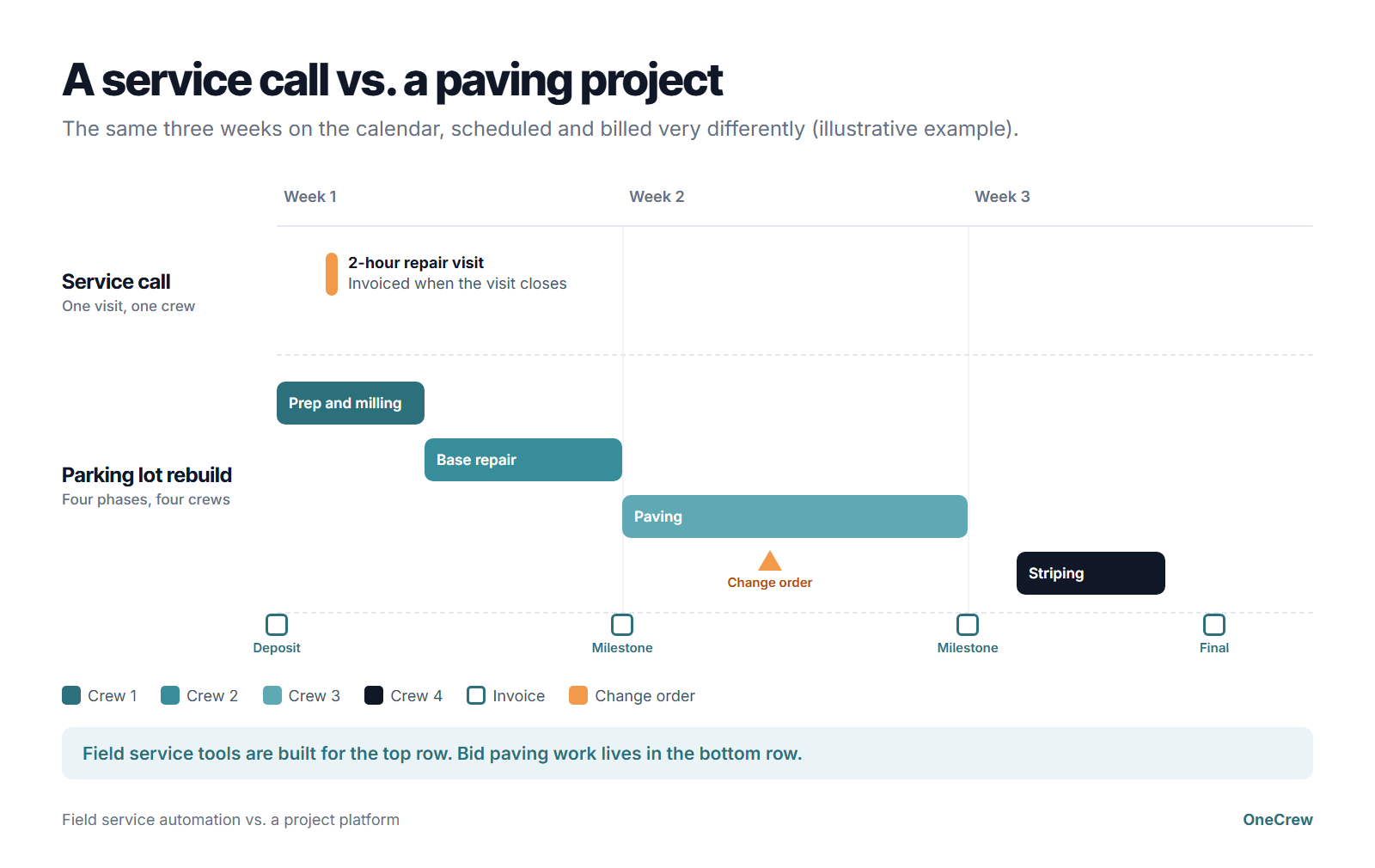
Neither category wins outright, and the honest answer follows your work mix. Run a high volume of short repair visits, and field service automation saves you real hours every week.
Run bid work where a single job spans three weeks, four crews, and a change order or two, and you need estimating depth that price books can't touch.
Contractors who live on bidding platforms built for asphalt already know this gap, because takeoff decides their margin long before a crew rolls out.
Plenty of companies run both kinds of work, with snow contracts and maintenance like sealcoating, crack filling, and striping filling the gaps between bid projects. For that mix, look for a platform that handles the project side well and treats those short visits as a smaller case of the same thing.
Field Service Automation Pros and Cons
Pros
- Dispatch gets faster and calmer once rules-based assignment kills the morning phone tree. Dispatchers stop guessing who's closest and start handling exceptions, the only part of that job that needs a human brain.
- Field data stops disappearing, because hours and quantities captured on site beat hours reconstructed on Friday from memory.
- Billing speeds up measurably when a closed job generates its own invoice, dropping the lag between finishing work and sending a bill from days to hours. Contractors floating payroll on a line of credit feel that shift in the first month, and it compounds when smoother payment systems let clients settle up without mailing a check.
- Customer communication runs itself through automated arrival windows and completion notices, which cut the inbound "where's my crew" calls and free your office staff for work that earns money.
Cons
- Estimating runs shallow on most field service platforms, which price from flat-rate books. That works fine for a water heater swap and falls apart on a multi-phase job, where you're calculating asphalt tonnage, estimating crew labor hours, and pricing equipment hours and subcontractor line items.
- Adoption takes the most work, because crews who've run paper tickets for 20 years need a reason to switch. If the app takes longer than the paper did, they'll quietly go back to paper.
- Automation can hide a bad process and hand you a faster broken workflow. Rabbet's respondents named a lack of organized process as the top cause of slow payment, and no dispatch rule fixes that on its own.
Should You Use Field Service Automation? Our Take
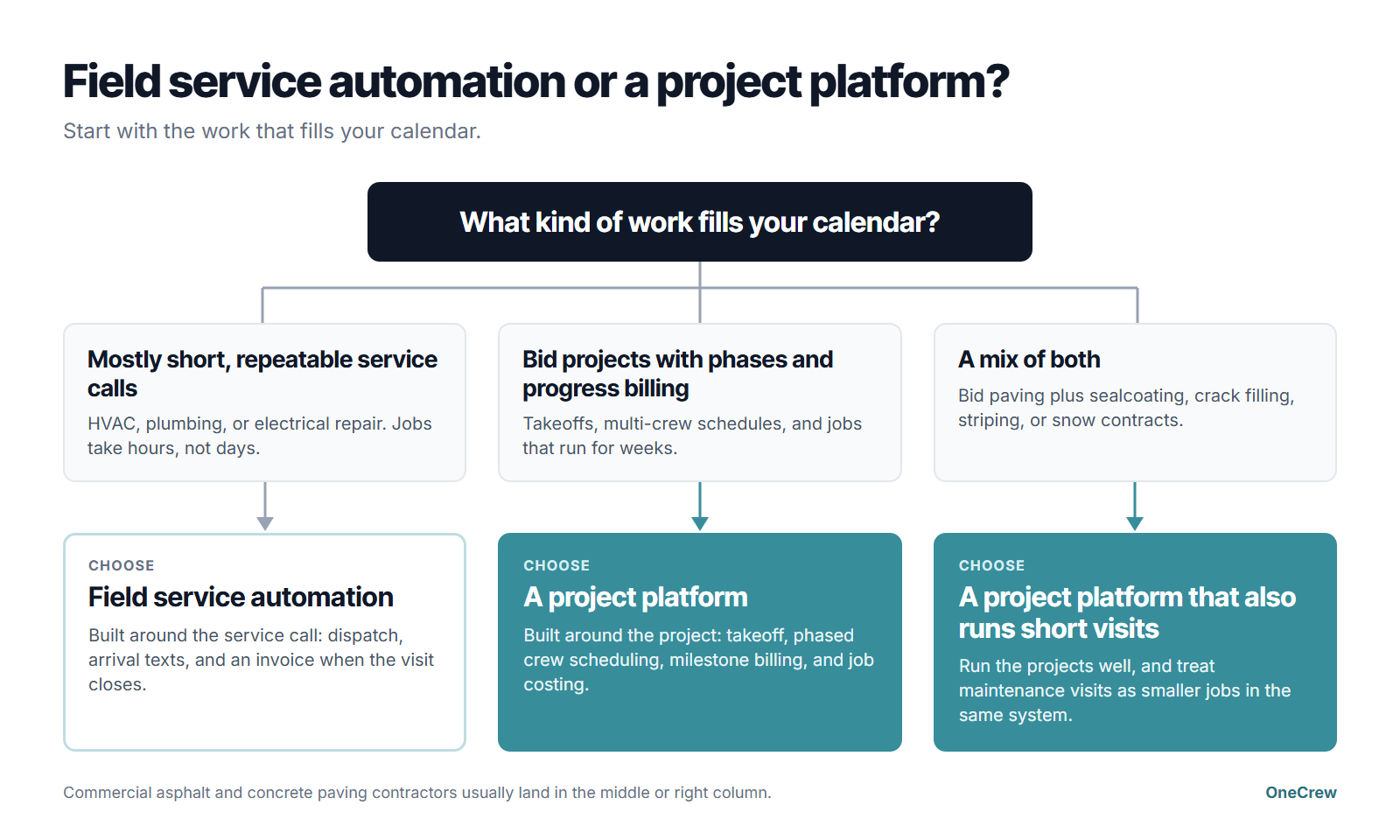
Field service automation earns its cost when your business runs on a steady volume of short, repeatable visits and your bottleneck is coordination.
If you're losing money because jobs get double-booked, tickets go missing, or invoices sit for a week, this category solves your problem directly.
Almost every platform in this category is one of the subscription platforms for contractors, priced per user or by team size on a monthly or annual plan.
Add up what coordination waste costs you each month, and compare the total with the subscription price.
If you're losing money because your bids are wrong, field service automation won't help much. That's an estimating problem wearing a scheduling costume.
Where field service automation fits best
- High-volume service work with several short visits per technician per day
- Recurring service contracts in technician-based trades, where the same sites cycle on a schedule
- Trades with standardized pricing like HVAC, plumbing, and electrical repair
- Teams drowning in customer status calls that automated messaging can absorb
Skip field service automation if you run projects
- Your average job spans weeks, moves through phases, and bills on progress
- You bid from plans or site measurements, so takeoff accuracy drives your margin
- Multiple crews and subs work the same job in sequence, each waiting on the phase before, so crew management matters more than routing
Commercial, project-based asphalt and concrete paving contractors land in that second group almost every time. The work looks like field service from the outside, and the economics behave nothing like it.
The case for automating project management applies to these teams too, and it points at bids, phases, and progress billing.
What a project platform changes on a paving job
Here's how a commercial parking lot job changes, step by step:
For project work, most of the time comes back in the office. OneCrew's own figures put the savings at 12 to 16 hours per estimator each week, and customers who collect through its integrated payments get paid 22 days faster on average.
How to Choose a Field Service Automation Platform
Judge every platform by how it handles your hardest job. Put these questions to each vendor on your shortlist:
- Can it price your most complex bid? Price books cover service calls, but takeoff-based work needs measurements, tonnage, labor, trucking, and equipment lines.
- Can it schedule a job across phases? Look for a calendar that breaks one job into stages and puts a different crew on each.
- Does billing match how you get paid? Look for deposits and milestone invoices if your jobs run longer than a day.
- Does it show estimated vs. actual cost by job? That report is how your next bid gets sharper.
- Will your foremen use the mobile app? Have one try it on a real job before you sign.
- What does it connect to, and what does each seat cost? Ask about QuickBooks sync, add-on fees, and what happens to your data if you leave.
If most answers come back "not really," you're looking at a tool built for service calls, and paving work needs a project platform instead. OneCrew is built for project-based paving contractors, with takeoff, phase scheduling, milestone billing, and job costing in one platform.
How to Get Started With Field Service Automation in 6 Steps
- Map your current job flow on paper first. Write out every handoff between a customer request and a paid invoice, then count how many times you type the same detail twice. That count is your business case.
- Pick the single bottleneck costing you the most, because dispatch chaos, missing field data, and slow invoicing are three different problems with three different fixes. Switching on all three at once usually means doing none of them well.
- Shortlist by work type before you compare feature counts, using the vendor questions above. The answers on your longest job and most complex bid separate service tools from project tools fast.
- Run one of your real jobs through the platform, start to finish, during a trial or demo. Watching your own job move from bid to invoice tells you more than a generic feature tour.
- Train the field before the office, because crews decide whether automation succeeds. Build the rollout the way you'd build roller operator training, with hands-on repetition and a clear reason the new way is easier.
- Set two numbers to watch, one for speed and one for accuracy, like days to invoice and estimate-versus-actual variance. Check them at 30, 60, and 90 days.
Pro tip: Roll out to your best crew first, then let them sell it. A foreman telling the yard "this saves me an hour a day" beats any memo from the office.
Field Service Automation Best Practices for Contractors
These habits get the most out of a new platform, before and after launch:
- Fix the process before you automate it, which means writing down the workflow you want and then configuring the platform to match it. Teams who skip this step automate whatever they happened to be doing in 2019.
- Capture the data your field already collects, since crews log hours, quantities, and photos whether you ask them to or not. A digital version of a habit they already have sticks. Six brand-new required fields do the opposite.
- Treat compliance paperwork as automation work, because daily reports, inspection photos, and safety records are the easiest wins in the whole category. The field already produces them on paper, so tying them to the job record turns your asphalt safety documentation into something you can find during an audit.
- Compare estimates to actuals every week, so your next bid starts from what jobs really cost. Contractors who review variance weekly can see which job types hold their margin and which ones leak it.
Three mistakes show up over and over:
- Buying on feature lists when the deciding factor is whether your crews will open the app
- Skipping integration planning, which leaves your accounting system on an island
- Automating customer messaging with the wrong tone, so clients get robotic texts from a business they picked for its handshake
Our Verdict on Field Service Automation
Field service automation does one job well: it removes coordination waste from repeatable service calls.
Vendors built these platforms around the service-call model, so the pricing, scheduling logic, and billing triggers all carry that DNA. Push a multi-phase paving project through one, and you'll spend your savings on workarounds.
Our honest read: if your calendar is full of two-hour HVAC, plumbing, or electrical calls, buy field service automation and thank yourself in a month.
If your calendar is full of three-week projects with takeoffs, phases, and progress billing, buy a platform built for project work and skip the service-call tools entirely. Half-fitting a system to your business is how contractors end up running five apps and trusting none of them.
Next Steps: Run Estimates, Crews, and Invoices in One Place
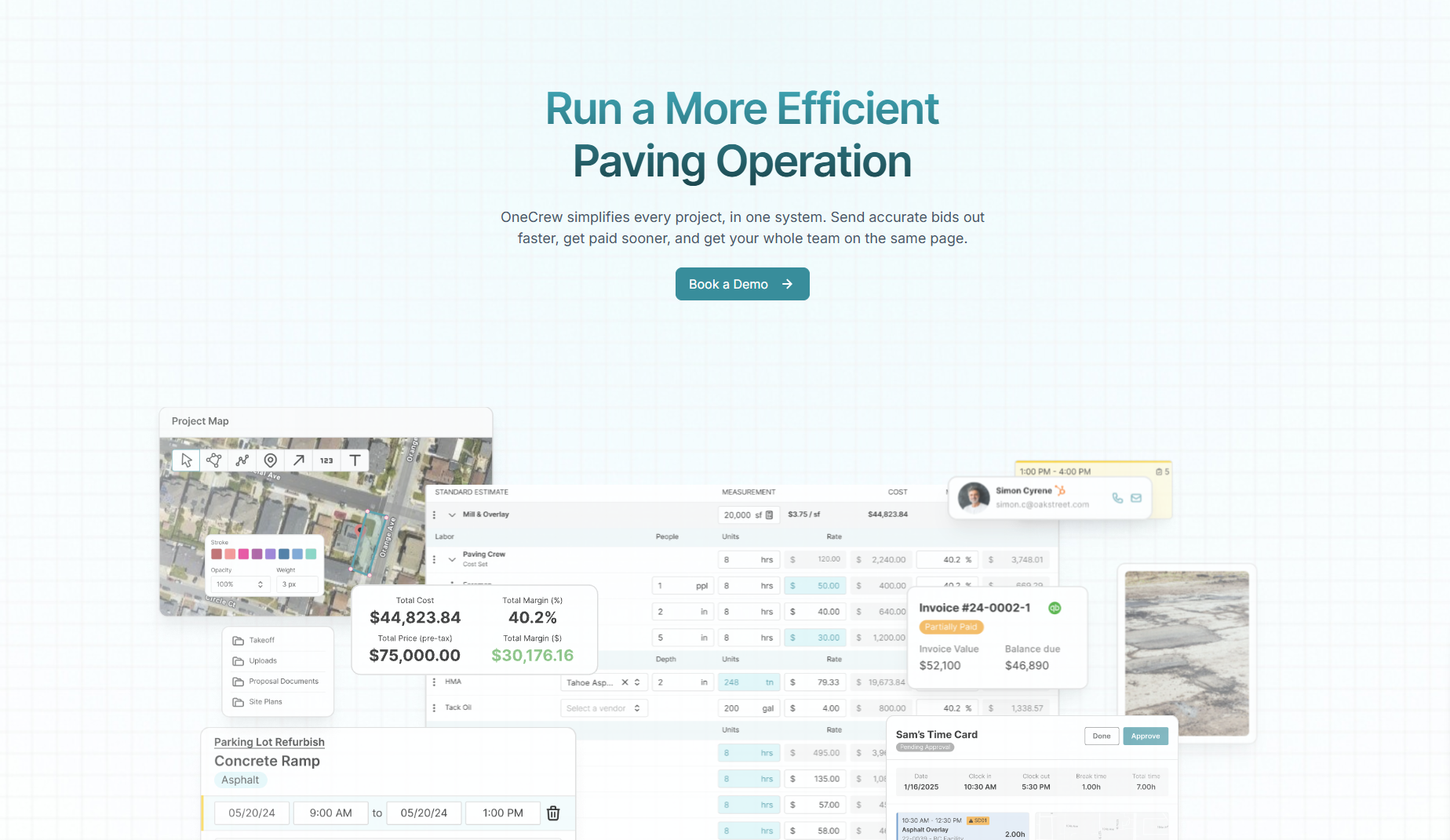
OneCrew is a platform built specifically for commercial asphalt and concrete paving contractors, from bid projects to sealcoating and crack-filling work. It replaces the patchwork of apps that leave your estimate, your schedule, and your invoice in three separate places. Here's what OneCrew covers:
- Build bids from takeoff: OneCrew's estimating tools let you run site and plan mapping and measurement on monthly satellite images or uploaded blueprints, then convert the drawing into tonnage, materials, trucks, and crews in a configurable estimate. OneCrew reports a 75% reduction in estimating time.
- Turn won bids into crew plans: OneCrew's scheduling feature assigns crew members and equipment to each service, splits multi-phase projects across weeks or crews, and sets each time block from the estimate's labor hours.
- Equip crews before they leave the yard: OneCrew's job site management tools push mobile work orders, job details, and GPS directions to crew phones. Approved time and daily actuals flow back to the office, where job costing compares them against the estimate.
- Get proposals signed and paid: OneCrew's customer portal gives customers one place to sign the proposal, see project updates, and pay invoices online.
- Track leads and repeat customers: OneCrew's CRM keeps every lead, follow-up, and customer relationship in one place.
- Invoice and sync to QuickBooks: OneCrew's invoicing tools generate invoices from the line items already in the platform, including deposit requests and milestone invoices, and sync invoicing and payment data with QuickBooks Online.
- Automate approvals and checklists: OneCrew's management automation sets estimate approval thresholds, sales hand-off checklists, and custom daily field reports, so jobs follow your process even when you're not on site.
Book a demo and see how OneCrew handles your work from takeoff to final payment.
FAQs
1. What is field service automation in simple terms?
Field service automation is technology that moves a field job from request to paid invoice without anyone retyping the details.
It handles scheduling, dispatch, mobile work orders, data capture, customer updates, and billing inside one system, so the job record travels with the work.
2. What is the difference between field service automation and field service management?
The difference is scope: field service management is the whole platform where your jobs, schedules, and customer records live, and field service automation is the set of steps that platform runs on its own.
Those steps include assigning a crew, texting an arrival window, and generating an invoice when a job closes. Nearly every platform sold today does both, so compare which steps each one automates for your kind of work.
3. How much does field service automation cost?
Field service automation is typically priced by user or team size, billed monthly or annually. Jobber starts at $29 a month for a single user on annual billing. Its Connect plan for a team of 11 to 15 runs $299 a month, billed annually. ServiceTitan doesn't publish prices and quotes each account.
Costs climb with add-ons like advanced routing, inventory tracking, and payment processing, so ask every vendor for a quote based on your actual seat count before comparing numbers. OneCrew, a project platform for paving work, prices by seat and shares pricing during a demo.
4. Is field service automation worth it for a small contractor?
Yes, field service automation is usually worth it for small service contractors whose technicians run several short calls a day, because coordination waste scales with job volume.
Contractors whose work is a handful of long, high-value projects get more from a project platform, where estimating accuracy drives profit more than dispatch speed does.
5. What is the best field service automation tool?
The best field service automation tool depends on the kind of work you sell. Jobber suits smaller service businesses handling quick jobs, and ServiceTitan fits mid-sized to large technician-based service businesses in trades like HVAC, plumbing, and electrical.
Commercial asphalt and concrete paving contractors are better served by a project platform like OneCrew, which is built around takeoff, phased crew scheduling, and progress billing. It also handles the recurring maintenance and snow removal contracts around those projects.