
SaaS for Contractors: What It Is and Why It Matters

SaaS for contractors is cloud-delivered subscription softwarethat gives construction teams access to project management, estimating, scheduling, and collaboration tools through any internet-connected device, with no local installation required. The formal term is Software as a Service, and it’s reshaping how contractors run jobs from the first bid to the final invoice. Platforms built on this model put real-time project data in the hands of field crews, project managers, and office staff at the same time. If you’re running a contracting business and still juggling spreadsheets, disconnected apps, and email chains, understanding SaaS is the first step toward fixing that.
What is SaaS for contractors, and what does it actually do?
SaaS for contractors covers a wide range of cloud-based tools, but they all share one defining trait: you pay a subscription fee and access the software through a browser or mobile app rather than installing it on a server you own. The construction SaaS market organizes these tools into four main categories, each targeting a different part of the project lifecycle.
The four primary categories are:
- Project management platforms handle scheduling, task assignments, document storage, and progress tracking across the full job.
- Estimating and bidding tools calculate material quantities, labor costs, and markup, then generate professional proposals.
- Field service management apps track crew locations, daily logs, equipment, and on-site conditions in real time.
- ERP (Enterprise Resource Planning) systems tie together financials, procurement, HR, and project data into one back-office platform.
Most contractors don’t need all four categories from a single vendor. The key is identifying which workflows are costing you the most time or money, then finding a platform that covers those gaps without forcing you to abandon tools that already work.
Pro Tip: Before evaluating any SaaS platform, list the three biggest bottlenecks in your current workflow. A platform that solves those three problems well beats a platform that does twenty things adequately.
The cloud delivery model also means your vendor handles software updates, security patches, and server maintenance. You’re not calling an IT contractor at 9 p.m. because the server room overheated. That operational simplicity is one of the most underrated benefits of SaaS for builders who don’t have dedicated IT staff.
How do SaaS contracts work, and what should you watch for?
A SaaS contract is a subscription agreement, not a software purchase. SaaS contracts grant time-limited usage rights, not ownership of the software itself. The moment you stop paying, your access stops. That’s a fundamental difference from buying a perpetual license, and many contractors don’t realize it until they’re mid-project and facing a renewal decision.
A standard SaaS contract covers several key areas:
- Service Level Agreements (SLAs): Defines uptime guarantees, response times for support, and what compensation you receive if the vendor misses those targets.
- Payment terms: Monthly or annual billing cycles, auto-renewal clauses, and price escalation terms.
- Data security and ownership: Specifies who owns your project data, how it’s stored, and what happens to it if you cancel.
- Liability limits: Caps on what the vendor owes you if the software fails during a critical project phase.
Contractors often misinterpret SaaS as a one-time purchase, which creates real operational risk when renewal time arrives unexpectedly or when a vendor changes pricing mid-contract. Treat the SaaS contract as an operational document, not just legal fine print.
Pro Tip: Always request a data export before canceling any SaaS subscription. Most platforms allow CSV or PDF exports of your project history, and you’ll want that record for accounting, disputes, or future reference.
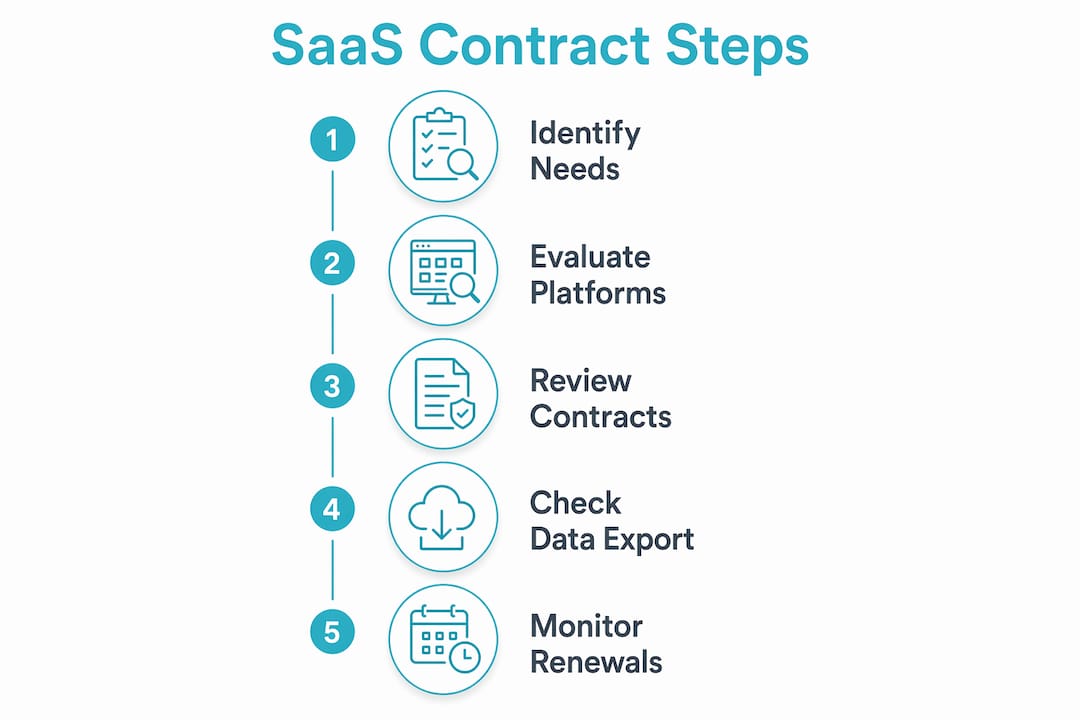
Pay close attention to data portability clauses. If you switch platforms after two years, you need your job history, client records, and financial data to move with you. Vendors that make data export difficult are a red flag worth noting before you sign.
What are the practical benefits of SaaS for contractors day to day?
The most tangible benefit of SaaS in contracting is that everyone on a project works from the same information at the same time. SaaS enables real-time collaboration across dispersed teams, giving field crews, subcontractors, and office staff a single source of current project data. That eliminates the version-control nightmare of emailing updated schedules or revised drawings back and forth.
Here’s how that plays out in practice across a typical project:
- Bid to kickoff: Estimating data flows directly into the project plan, so quantities and scope are consistent from the first proposal through mobilization.
- Daily field operations: Crew leads log hours, materials used, and site conditions from a mobile app. That data updates the project budget and schedule in real time without a phone call to the office.
- Change order management: When scope changes, the project manager updates the platform and the client receives a notification immediately. No delays, no disputes about what was agreed.
- Invoicing and closeout: One up-to-date operational platform means invoicing pulls directly from completed work records, reducing billing errors and speeding up payment cycles.
For paving and specialty contractors in particular, the ability to track crew locations, material deliveries, and job progress from a phone is a significant operational upgrade. You’re not waiting until end-of-day to find out a crew ran short on material or a job ran well over schedule.
Good construction document management also becomes far easier when everything lives in one cloud-based system. Permits, drawings, inspection reports, and change orders are searchable and accessible to anyone with the right permissions, from anywhere.
How does SaaS compare with traditional software and custom solutions?
The honest comparison between SaaS and traditional on-premises software comes down to three factors: cost structure, maintenance burden, and flexibility.
Traditional software gives you more direct control over your data and doesn’t depend on internet connectivity, but the maintenance costs and update cycles add up fast. Most contractors running crews across multiple job sites find the mobility of SaaS worth the trade-off.
The more interesting comparison right now is SaaS versus AI-powered custom tools. Construction software needs are varied and complex, and some contractors are exploring custom-built workflows or integration plugins that connect best-in-class tools rather than relying on a single platform. That approach offers more flexibility but requires more technical management. For most small to mid-size contractors, a well-chosen SaaS platform with strong integration capabilities covers the bases without the overhead of custom development. Reviewing the best construction project management software options is a practical starting point for that comparison.
Key takeaways
SaaS for contractors works best when it replaces fragmented, disconnected tools with a single platform that carries project data from bid through final invoice.
See how OneCrew handles this for paving contractors
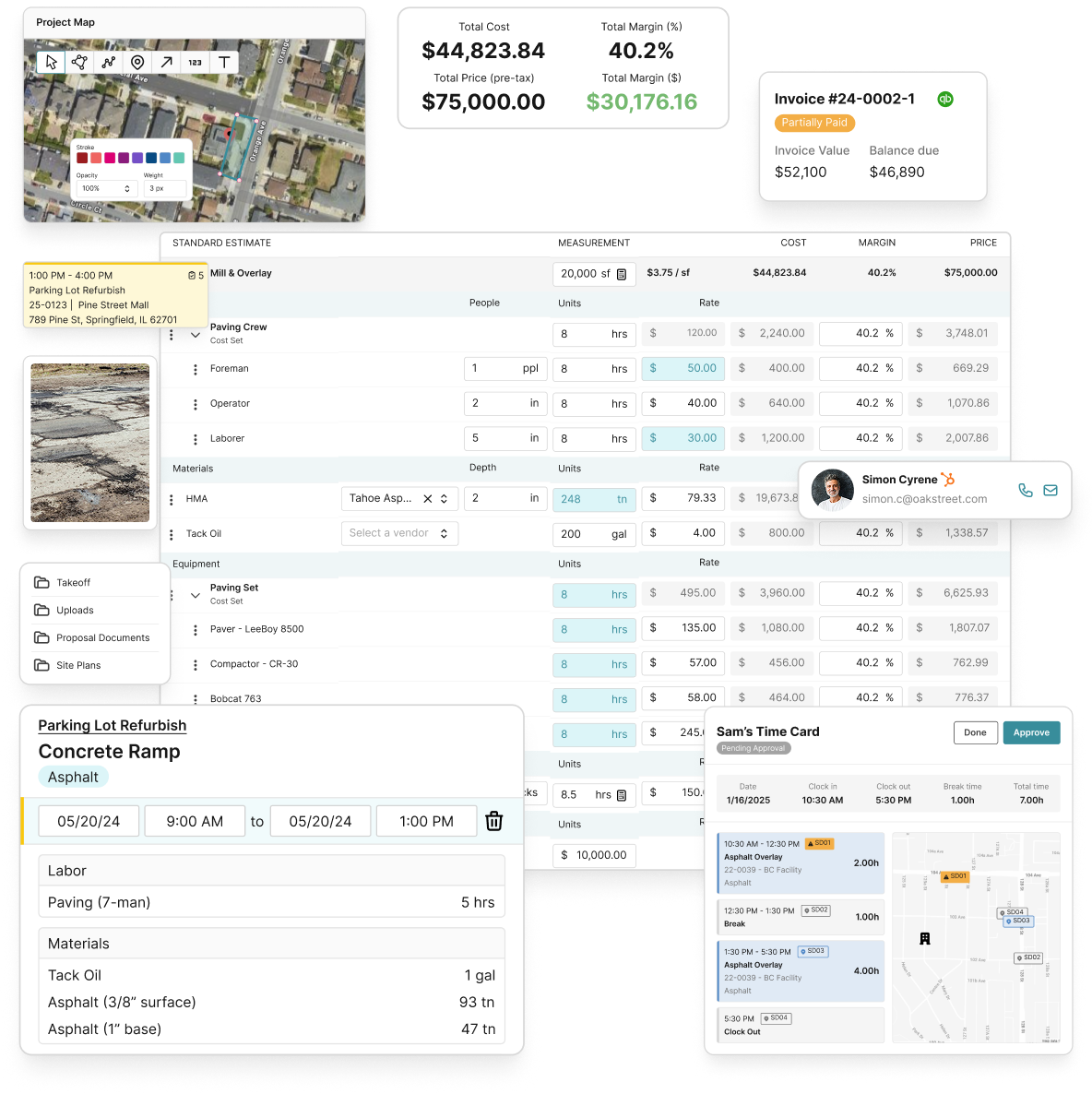
OneCrew is a SaaS platform built specifically for asphalt paving and paving-related contractors. It covers the full project cycle from automated estimating and interactive mapping through scheduling, field data entry, and digital invoicing. Everything runs in the cloud, so your office team and field crews always work from the same current data. OneCrew integrates with accounting systems and provides real-time analytics so you can see job profitability without waiting for month-end reports. If you’re a paving contractor looking to replace disconnected tools with one platform that actually fits how your crews work, OneCrew is worth a close look. Book a demo to see it in action.
FAQ
What does SaaS mean for a contractor?
SaaS stands for Software as a Service. For contractors, it means accessing project management, estimating, and field tools through a subscription rather than buying and installing software on a local computer or server.
Is SaaS better than traditional construction software?
SaaS offers better mobility, automatic updates, and lower upfront costs compared to traditional on-premises software. Traditional software gives you more direct data control, but most contractors find the trade-off favors SaaS for day-to-day field operations.
What happens to my data if I cancel a SaaS subscription?
Access to the platform stops when your subscription ends. Most SaaS contracts include data export options, but you should confirm data portability terms before signing and export your records before canceling.
What are the most common SaaS tools for contractors?
The main categories are project management platforms, estimating and bidding tools, field service management apps, and ERP systems, each covering a different part of the contractor workflow.
How much does contractor SaaS software typically cost?
Pricing varies widely based on platform, user count, and features. Most SaaS tools for contractors use monthly or annual subscription pricing, scaling with company size and scope.

