Construction Field Management: 7 Steps for Commercial Pavers

Your foreman knows exactly what happened on that parking lot yesterday. Nobody in the office does, and they won't until the paperwork lands on Friday.
Construction field management closes that gap so you can bill, cost, and schedule off real numbers. We dug into how paving contractors run it day to day and where it falls apart.
By the end, you'll know what your crews should track, what they can skip, and how to build a field process they'll use.
What Is Construction Field Management?
Construction field management is the process of assigning work to crews, recording what they do, and getting that record back to the office fast enough to act on it.
On a paving job, that means work orders, hours, tonnage, and photos moving from the truck to the office the same day.
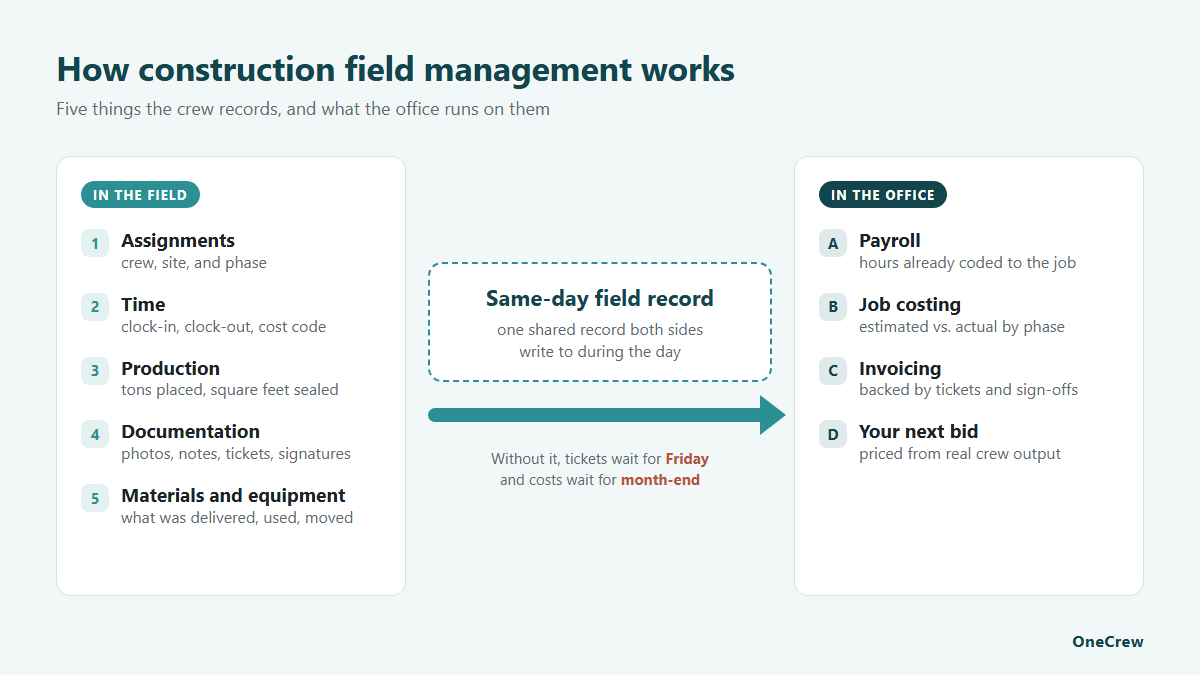
The office side gets all the attention. Bids, contracts, schedules, and invoices live there. Every number in that system started as something a foreman saw at 6 a.m. on a jobsite, so the quality of your field operations decides whether those office numbers mean anything at all.
What construction field management covers
On a paving crew, field management handles five things:
Those five feed everything downstream, because payroll, job costing, invoicing, and your next bid all depend on the field getting them right. Strong paving project management treats field data as the source and the office as the place that reads it.
How field management differs from office project management
Office project management plans the work, and field management records it. Your estimator decides a parking lot needs 420 tons at a set crew size. Then your foreman finds soft sub-base, and the real number turns out to be 480.
That difference is where you make or lose money. A field process that captures the 480 the same day lets you file a change order while the customer still remembers the conversation. A process that surfaces it three weeks later hands you a thinner margin and a story about why.
Who handles field management on a paving job
Field management runs through three roles:
- Foreman: runs one crew on site, assigns the day's tasks, and logs hours, quantities, and photos.
- Superintendent: oversees several crews or sites, handles schedule changes and site problems, and checks that every crew's record is complete.
- Project manager: owns the job's budget, schedule, and customer from the office, and turns field data into change orders, job costs, and invoices.
Some contractors call the superintendent-level role a field manager. According to The Birmingham Group's 2026 salary research, on larger construction projects ($5 million to $49 million), a superintendent earns a median base salary of $126,900 to $156,900, depending on region.
On $10 million to $49 million projects, the same survey publishes a base pay range of $108,000 to $183,000 for a project manager.
Why Construction Field Management Breaks Down on Paving Jobs
Field management breaks down because the field and the office keep two different sets of books.
One lives in a foreman's head and a stack of tickets; the other lives in accounting three days behind, and nobody reconciles them until month-end. Better crew management starts with one shared record that both sides write to during the day.
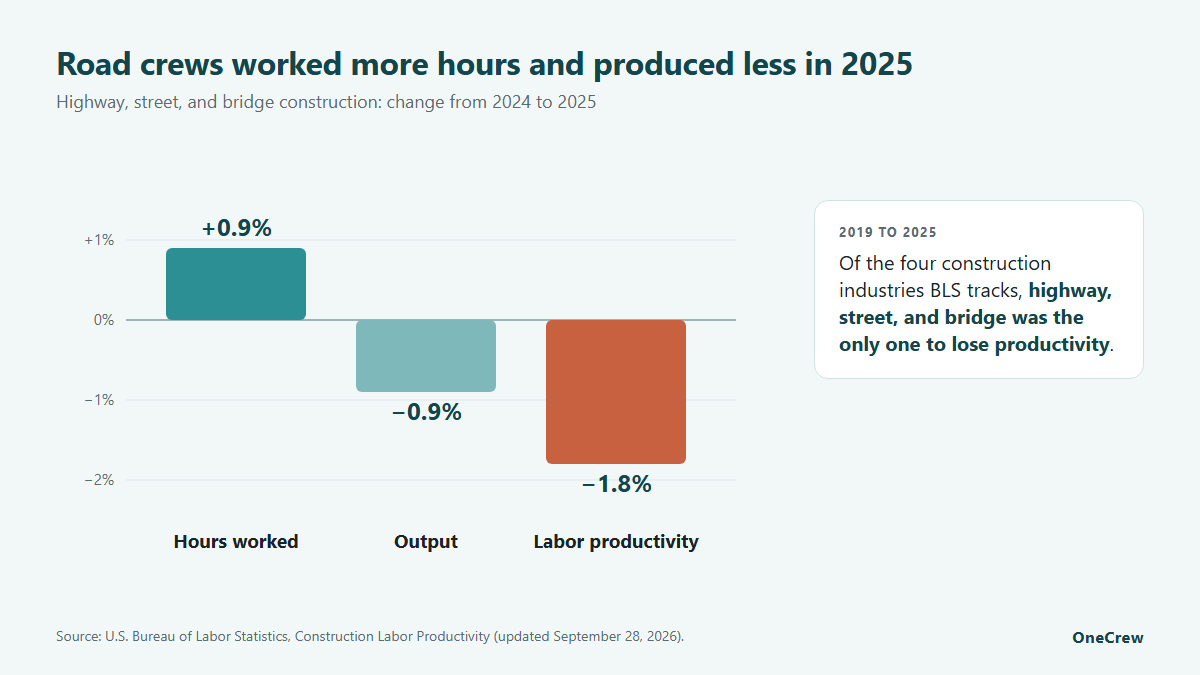
Productivity in road work has been heading the wrong way. The Bureau of Labor Statistics (BLS) tracks labor productivity across four construction industries, and from 2019 to 2025, highway, street, and bridge construction was the only one that lost ground.
In 2025 alone, that industry's output fell 0.9 percent while hours worked rose by the same amount.
The gap between the truck and the office
Ask a foreman what slowed his day down, and he'll tell you about a missing tack coat delivery or a gate that was still locked at 6:30. Ask the office, and you'll hear about a timesheet that showed up with ten hours on it and no cost code.
Both answers are right. The gap is structural, and every crew you add widens it. With two crews, chasing paperwork is a nuisance; with five, it's a full-time job for somebody with a phone and a truck.
What the delay costs you
Late field data hits you in three places:
- Billing: finished work sits uninvoiced for weeks, dragging your cash flow into next month.
- Job costing: you find out a job lost margin after the crew has already moved on.
- Bidding: your next estimate leans on last year's assumptions because nobody trusts the actuals.
In the 2026 Workforce Survey from the Associated General Contractors of America and NCCER, 88 percent of firms with craft openings said those jobs were as hard or harder to fill than a year earlier. Worker shortages were also the most commonly cited cause of project delays.
When hiring your way out of a bad process stops being an option, the process itself has to get better.
The 5 Essential Parts of a Construction Field Management System
Every field management setup handles the same five jobs, whether it runs on carbon-copy tickets or a phone. The contractors who pull ahead usually get there by automating the handoffs between field and office, so nobody types the same number twice.
1. Daily work orders and crew assignments
A work order tells a crew where to go, what to do, and what finished looks like. The good ones fit on one screen: site address, scope, phase, quantities, equipment, and the two or three notes that change the day (locked gate, no parking after 7, call the property manager on arrival). Anything longer than one screen, and a foreman stops reading partway through.
Contractors managing multiple construction projects in the same week live or die on this one. Publish assignments the night before, and mobilization stops eating the start of every morning.
2. Time tracking and labor hours
Field time tracking should capture hours against a job, a phase, and a cost code. Crews skip that last piece constantly, which is why so many contractors can tell you their total labor cost and have no idea which jobs earned it.
Keep the entry brutally simple. If clocking in takes more than a few taps, your foreman will do it for the whole crew from memory at lunch, and your data quality drops to whatever he remembers.
3. Production quantities and job costing
Production quantities turn hours into a cost per unit. Tons placed, square feet sealed, and linear feet of joint sealed are what let you measure a job against its estimate and against your own history on similar work.
Pair those quantities with labor, material, and equipment cost, and you get margin by phase, which is the number worth managing. A construction project management platform that carries the estimate and the field data together removes the reconciliation step completely.
4. Photos, notes, and signatures
Photos are the cheapest dispute insurance you can buy. Before, during, and after shots take a crew a few minutes and settle arguments that would otherwise eat a day of somebody's time.
Notes do the same work in text form. A foreman who writes "customer moved the dumpster onto the north bay at 9:15" has documented a change order before anyone knew there was one.
5. Materials and equipment movement
Delivery tickets, mix designations, temperature at the truck, and which roller went to which site. Crews hate this part, and estimators need it, so capture it at the moment it happens, or you'll be rebuilding it later from a group text.
What You'll Need Before Setting Up Field Management
Have these ready before step 1:
- A cost code list: the codes your crews will book time and quantities to.
- A crew list: every crew, its foreman, and its members.
- Your field forms: every ticket, timesheet, and checklist in use today, for the cut in step 3.
- A phone for every foreman: the training in step 6 happens on that device.
How to Set Up Construction Field Management in 7 Steps
1. Map how a job moves today
Write down every step from signed proposal to final invoice, phone calls included. Expect more handoffs than you'd guess, and circle every spot where somebody retypes a number that already exists.
How to map it:
- Pick one recent job: use a finished parking lot or overlay job, so every handoff is already on record.
- List each handoff in order: for example, proposal signed, job keyed into a spreadsheet, foreman texted the address, tickets photographed, tons retyped onto the invoice.
- Note the tool at each step: paper, text, spreadsheet, or accounting, plus who touched it.
- Mark the waits: anywhere the job sat, like a timesheet waiting for a cost code or tickets waiting for Friday.
Pro tip: Walk the map with a foreman as well as the office, since the field sees handoffs the office never hears about.
2. Standardize the daily work order
One format per type of work, used by every crew on every job. Sealcoating and mill-and-fill need different fields, so build two templates and stop there. Every extra template is a training cost you pay forever.
What each template needs:
- Both templates: site address, gate and parking notes, the customer's on-site contact, scope, crew, and equipment.
- Sealcoating: square footage, product and number of coats, crack-fill linear feet, and the striping layout if it's part of the job.
- Mill-and-fill: area, mill depth, mix type, lift thickness, tons ordered, trucks scheduled, and the traffic control plan.
Pro tip: Run each template on one live job before you hand it to every crew.
3. Cut field paperwork down to what someone reads
Pull your current field forms and cross out any field nobody has looked at in six months. Crews fill out what they believe somebody reads, and honestly, they're right to.
How to run the cut:
- Lay every form side by side: timesheets, delivery logs, daily reports, inspection sheets, and safety checklists.
- Ask what decision each field changes: if nobody can name one, the field goes.
- Move office-only fields off the field form: billing address, PO number, and tax details belong in the office's record.
- Merge what's left into one daily report: the paving daily report table later in this guide is a starting point.
Pro tip: Ask the office who reads each field before you cut it, so you don't drop one that payroll or billing depends on.
4. Give the field one place to ask questions
Job questions scattered across texts, voicemails, and a group chat are gone by Thursday. One thread per job keeps decisions attached to the work they affect, so when a customer asks who approved something in August, you can scroll back and show them.
How it works:
- Open the thread when the contract is signed: post the work order, site map, and who to call on site first.
- Route every change through it: a change the customer asks for on site gets a photo and a note in the thread before the crew acts on it.
- Name who answers: one person in the office owns each job's thread, so questions don't sit.
Pro tip: Post the answer in the job thread even when the question came in by phone, so the decision stays on the record.
5. Close the loop on job costs every week
Pick a day, pull estimated against actual by phase on every open job. Weekly is early enough to fix a crew size or rerun the truck count on a haul while the job is still running.
What to pull each week:
- Labor hours: what each open phase used versus what you bid.
- Quantities: what each crew placed or sealed, next to the estimate.
- Material: tons delivered against the tons the job should have used.
- Outliers: set a variance you care about, such as 10 percent, and look only at phases past it.
Your bids sharpen the same way. Contractors running asphalt bidding tools against real production history stop guessing at crew output and start pricing from what their own crews produce. Plug those numbers into our free asphalt labor calculator to see the crew hours a job needs before you price it.
Pro tip: Write down one action for every outlier you find, and check the next week whether it worked.
6. Train on the phone your crew already carries
Field training sticks when it happens on a live job with the actual device in the actual hands. Two ten-minute sessions on site beat an hour in a conference room.
A two-session plan:
- Session one: clock in the crew, open the day's work order, and log hours to the right cost code.
- Session two: enter quantities, take the required photos, and submit the daily report.
- First week: check every entry the same evening and fix problems with the foreman the next morning.
Pro tip: Plenty of paving crews include workers whose first language isn't English, so lean on taps, photos, and icons more than written instructions.
7. Review the numbers with your foremen monthly
Show foremen their own production numbers. Once a crew leader sees his tons per crew-hour next to the estimate, the data becomes his scoreboard.
What to bring to the review:
- Three numbers per crew: tons per crew-hour, labor cost per ton, and daily report completion rate, all from the metrics table below.
- One comparison: this month's numbers next to the estimate and next to last month.
- One goal: agree on a single number to move before the next review.
Pro tip: Go over each crew's numbers with its foreman one-on-one, so the review reads as coaching rather than a public ranking.
Mistakes That Sink a Field Management Rollout
Watch for these four mistakes as you roll out:
- Going live with everybody at once: start with one crew and one foreman who wants it.
- Tracking everything: pick the ten fields that change a decision and let the rest go.
- Skipping the office side: if the office keeps re-entering data by hand, the field stops believing any of it matters.
- Tracking revenue and calling it margin: revenue flatters your numbers; margin tells you what the job earned.
Field Management Metrics Worth Tracking
Track these six metrics every week, each pulled straight from the field data in this guide:
Construction Field Management for Asphalt and Concrete Paving Work
Paving adds constraints that generic construction apps ignore. Your work is temperature-dependent, weather-dependent, and much of it is placed and finished in a single shift, so a field process built for a six-month building project will fight you.
Temperature, weather, and the compaction window
Mat temperature governs a paving day, and your field records should prove you respected it. Minimum surface temperature moves with lift thickness.
For example, West Virginia's 2023 highway specifications set these minimums:
- Under 1.5 inches: 50°F
- 1.5 to 2.9 inches: 40°F
- 3 inches and over: 35°F
Every agency writes its own table, so check the spec on your contract before the crew mobilizes.
Logging mix temperature at the truck, surface temperature at the mat, and roller pass counts gives you a defensible record when a density test comes back short. Those same logs tell you whether your roller operator training is landing or whether one operator is quietly rolling cold.
Tonnage, yield, and material reconciliation
Yield tells you whether you placed what you paid for. Compare tickets against measured area and thickness on every job, and do it that week.
The math punishes small errors fast. A quarter inch of extra thickness across a 20,000-square-foot lot works out to roughly 30 extra tons at a typical 145 pounds per cubic foot, which is real money nobody bid. Run your own lots through our free asphalt tonnage calculator before the mix order goes in.
Getting your crews to record depth checks is the front half of calculating asphalt yield with any confidence.
Work zone safety and traffic control
Field management includes proving your traffic control went in correctly.
Federal Highway Administration data shows 850 people were killed in work zone crashes in 2024, which works out to at least two deaths a day.
Photograph the setup before the crew starts. A timestamped shot of cones, signs, and flaggers in position costs nothing and answers the first question after any incident: was traffic control in place? Tie it to your daily asphalt safety checklist so it happens without anyone having to remember.
Concrete pours and batch tickets
Concrete crews need the same record: log batch tickets, pour start and finish times, and site conditions on the day of the pour, so a failed test or a cracked slab has a paper trail behind it.
Days when three crews are on three sites
Multi-crew days are where field management earns its money. Two things make them survivable: assignments published before the day starts, and a single place where every crew reports progress as they go.
Miss either one, and your superintendent spends the day driving between sites to collect information he could have read off a phone in the truck.
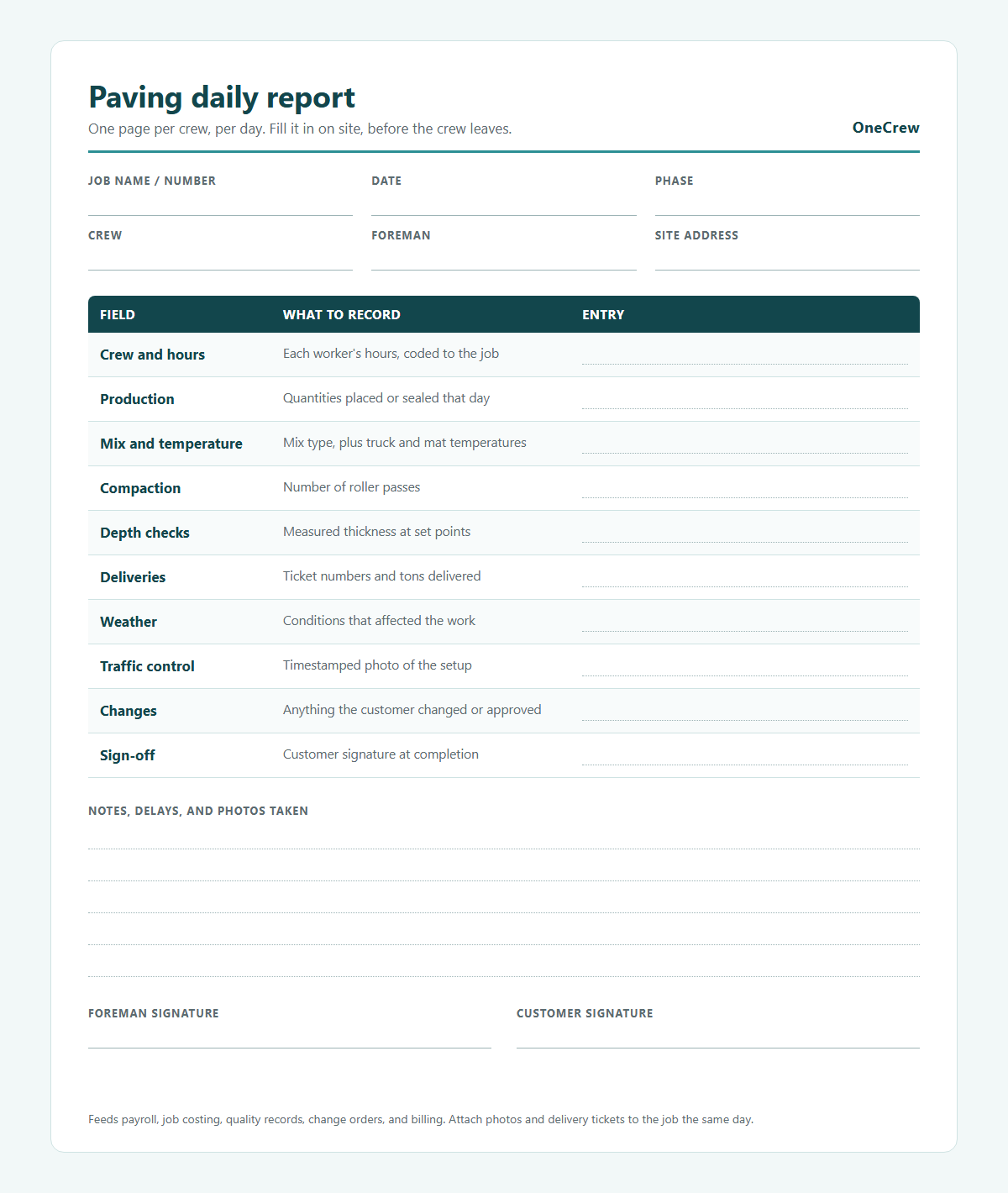
What goes in a paving daily report
A good daily report pulls everything above onto a single page for each crew, each day. Build it around these fields:
What to Look For in Construction Field Management Software
Built for project-based paving work
Most field apps target service work: one tech, one address, one ticket, one invoice. Paving runs on projects with phases, several crews, and progress billing across weeks. Ask any vendor to walk you through a three-phase job with two crews before you look at a single other feature.
Works with one thumb and bad signal
Your crews wear gloves and stand next to a running paver. A screen that needs two hands and four typed fields will lose to a pencil every time. Rural jobs lose signal, so ask every vendor what happens to an entry when the connection drops, and watch a foreman clock in a crew one-handed during the demo.
Estimates and field data in the same place
A big jump in accuracy comes from one system holding both the estimate and the actuals. When cost codes carry over automatically, weekly job costing turns into a quick check a project manager can do between calls.
Look closely at accounting when you demo anything. QuickBooks-style connections typically move invoicing and payment data, while job-cost detail stays put, so confirm where your costing sits before you sign.
Where these platforms fall short
A few honest limits worth knowing up front:
- No app fixes a foreman who has decided not to use it, because adoption is a management problem.
- Setup is real work, since you build cost codes, crew lists, and work order templates before day one.
- Reporting only reflects your inputs, and sloppy cost codes produce confident, wrong dashboards.
Want to see these checks on your own jobs? Book a OneCrew demo.
Run Construction Field Management, Estimating, and Billing in OneCrew
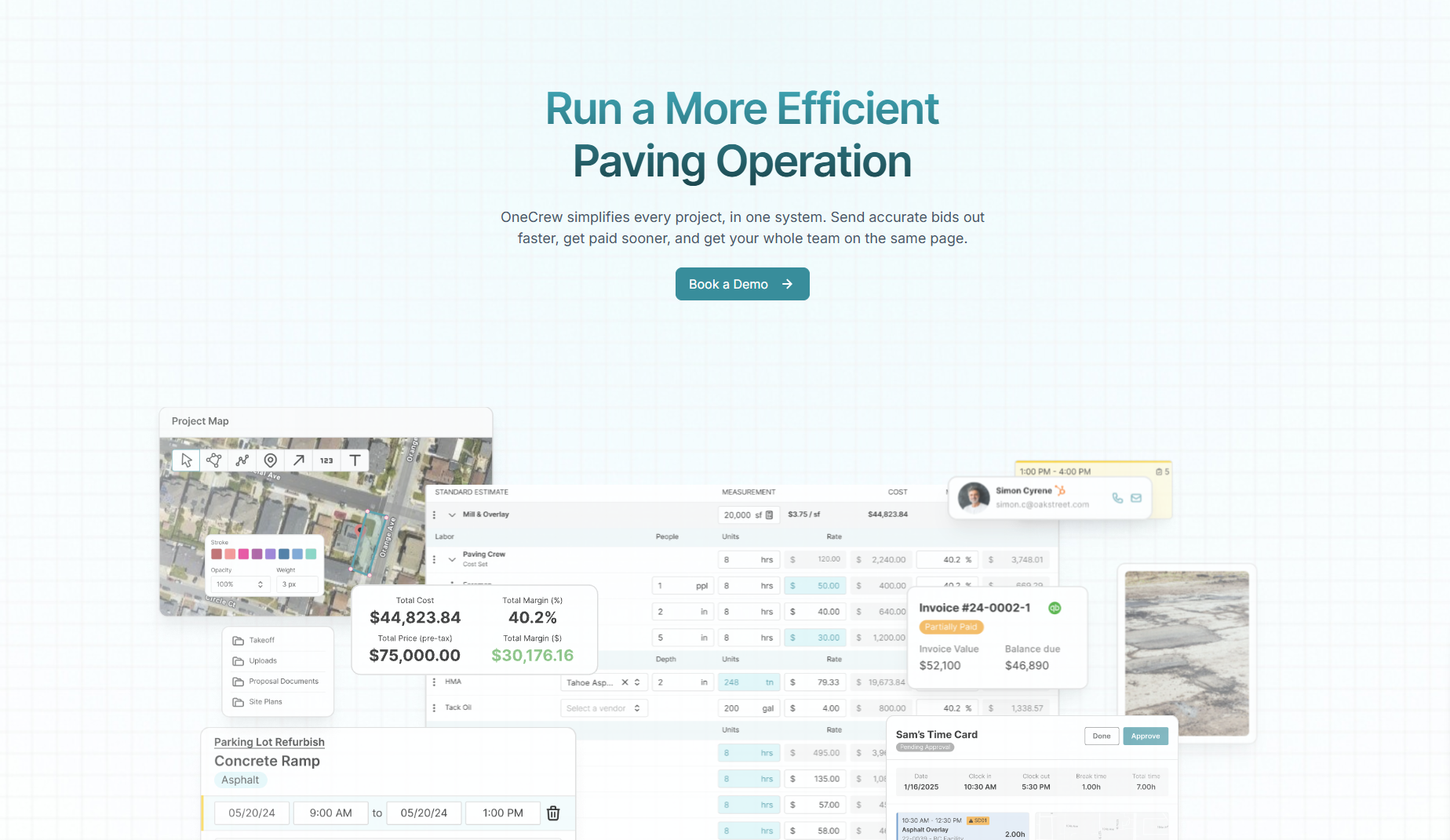
OneCrew is a platform built for commercial, project-based asphalt and concrete paving contractors. It replaces the group texts and carbon-copy tickets with one system that runs from lead intake to final invoice, so nobody re-enters a number along the way.
Here's what OneCrew covers:
- Measure and price jobs: OneCrew's estimating tools turn a drawing on a satellite site map into tonnage, materials, trucks, and crews, starting from your default margins. Takeoff from uploaded plans is available for an additional fee. Reusable bid structures keep your pricing logic consistent across every estimator and every job. Estimating time drops by 75 percent, according to OneCrew.
- Plan crews by phase: OneCrew's scheduling feature moves every signed job into a scheduling queue and lets you split multi-phase work across crews. When you drag a job to a new day, each crew sees the change. OneCrew reports a 90 percent cut in scheduling communications.
- Dispatch work orders: OneCrew's field management tools put each job's details on every crew's phone and pull time, production quantities, and field photos back to the office as work happens. OneCrew has generated and sent more than 100,000 work orders to crews in the field.
- Track job costs: OneCrew's job costing compares what you estimated against what your foreman submitted from the field (labor, materials, and trucking) on each job.
- Send proposals for signature: OneCrew turns your estimate into a branded proposal, and each project's customer portal lets the client review and sign it alongside their documents and messages.
- Keep one record per account: OneCrew's CRM tracks leads, follow-ups, bids, and work history by account and jobsite, so a returning property manager hears from someone who already knows their last job.
- Get paid faster: OneCrew's invoicing tools generate invoices from the line items already in the platform and sync invoicing and payment data with QuickBooks Online. OneCrew customers using integrated payments collect invoices 22 days faster on average.
You need one platform where the estimate, the crew, and the invoice all reference the same job and the same margin target from takeoff to final payment. Texas Parking Lots, a OneCrew customer, cut the time from job acceptance to job completion by 24 percent.
Book a demo to see how OneCrew runs work orders, crew time, and job costing on a real paving job.
FAQs
1. What does a construction field management system do?
A construction field management system assigns work to crews, records what they complete, and delivers that record to the office the same day.
It handles work orders, time against cost codes, production quantities, photos, and material tickets so payroll, job costing, and invoicing all run on field data.
2. What is the difference between field management and construction project management?
The main difference between field management and construction project management is where each one operates.
Project management plans and prices the work from the office, and field management captures what happens at the jobsite so you can correct those plans against reality.
3. How do paving contractors track labor hours in the field?
Paving contractors track labor hours by clocking crews in against a specific job, phase, and cost code from a phone or tablet. Crew-level clock-in works fine for small crews, and per-worker entry gives you cost per ton by crew, which is what you need for bidding.
4. Can construction field management work without internet on the jobsite?
Yes, construction field management can work without internet, but only if your platform stores entries on the device and syncs them later. Web-based apps need a signal, so ask each vendor how theirs handles a dead zone before you commit.
5. How long does it take to roll out construction field management?
Rollout time depends mostly on setup work: cost codes, crew lists, and work order templates. Training is the quick part, since two short sessions on site cover clock-in, work orders, quantities, and the daily report. Begin with a single crew, then expand company-wide once the process holds up on real jobs.
6. Can OneCrew help with construction field management?
Yes. OneCrew covers the field side of the job (work orders, crew clock-ins, daily actuals, and jobsite photos) and ties it to the estimate and the invoice. The office sees each job's cost against its bid without anyone retyping a number.
7. What's the hardest part of construction field management?
The hardest part of construction field management is adoption. A field process only works if foremen use it every day, so pilot it with one willing foreman, keep entry to a few taps, and show crews how their numbers stack up against the estimate. When Golden State Paving replaced spreadsheet estimating with OneCrew, 88 percent of its workforce had adopted the system in under 30 days.
8. What does a field manager do in construction?
A field manager runs the jobsite side of a construction project: assigning crews, tracking hours and production, solving site problems, and getting the day's record to the office. On paving jobs, a superintendent or senior foreman often fills that role.