
Job Costing in Construction: How to Protect Your Margin

Every paving contractor knows the feeling. The bid looked strong, the crew hit the schedule, and then the final numbers came in soft and nobody can say exactly why. Job costing in construction answers that question while the crew is still on site.
I've watched contractors run this on paper tickets, spreadsheets, and one platform, and the ones who know their numbers get field data to the office fast.
Here's how it works on a real paving job, from cost codes through closeout, plus the mistakes that drain your margin.
How to Do Job Costing in Construction: TL;DR
- Build a cost code list your crews will use
- Turn the winning estimate into a job budget
- Capture labor hours every day
- Track materials by the ton and the ticket
- Charge equipment time to the job
- Compare actual costs to the budget before the job closes
- Close the job out and feed the numbers into your next bid
What Is Job Costing in Construction?
Job costing in construction is the practice of tracking every direct cost tied to a single job: labor hours, material tonnage, equipment time, subcontractor invoices, and the odd permit or traffic control bill. You compare those actual costs against the numbers in your bid, then act on the gap.
Company accounting tells you how the year went. Job costing tells you how Tuesday's parking lot went, and that's the number you can still do something about.
It also closes the loop on project centralization: your estimate sets a target, and job costing tells you whether that target survived contact with the crew, the weather, and the plant.
Why job costing matters more in paving
Paving runs on thin margins. Well-managed construction companies land in the 5–8% net margin range, so a $180,000 parking lot at 7% leaves you roughly $12,600 in profit.
Two extra crew days, one short load, and a rented roller nobody charged to the job can swallow most of that before anyone notices.
Material prices refuse to sit still, either. The producer price index for asphalt paving mixtures dropped about 7% between January and April 2026, then climbed again in May.
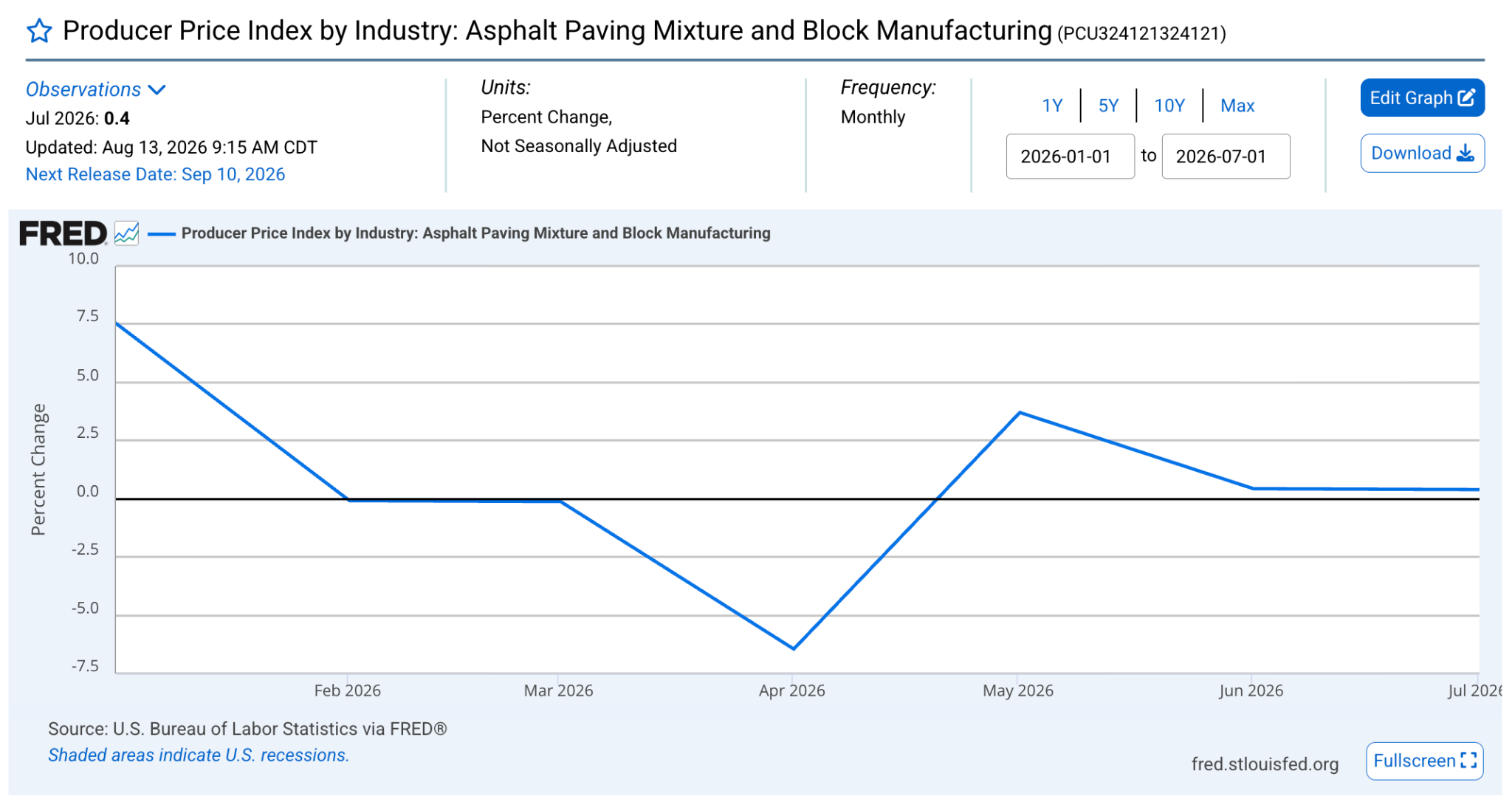
A bid priced in March can pave in July at a different cost per ton. Layer on a mix that covers less ground than your yield math assumed, or a specialty material like asphalt mastic priced differently than your standard mix, and the tonnage line goes sideways fast.
Then there's the market itself. US paving contractors brought in about $17.6 billion in 2026, with revenue sliding at a 2.3% annual rate over five years. When bids get tighter, you can't price your way out of a costing problem. You have to cost your way out.
What You'll Need Before You Start
Job costing works when the inputs exist before the first truck rolls. Get these pieces in place first:
- A short cost code list that matches how your crews already work
- Burdened labor rates by position, covering payroll taxes, workers' comp, and safety costs, plus a construction management checklist so nothing else slips through
- Internal hourly rates for owned equipment, plus current rental rates
- The winning estimate broken into the same categories you plan to track
- One field reporting routine everybody follows, whether that's a paper ticket or a phone
Time required: Two to three days to build your cost codes and rates. After that, plan on 10 to 15 minutes a day per open job.
Five buckets cover almost every dollar on a paving job:
If subcontractors regularly work your jobs, the right construction management software for subcontractors keeps their invoices tied to the same cost codes as your crew's hours, instead of landing in a separate system.
How to Do Job Costing in Construction
Job costing in construction works as one loop that starts with your cost codes and ends with a sharper bid. Order matters here, because each piece feeds the next one:
1. Build a cost code list your crews will use
Start with codes narrow enough that a foreman can pick the right one in three seconds. Most paving contractors do fine with 15 to 25 codes covering mobilization, milling, patching, paving, sealcoating, crack sealing, striping, traffic control, and cleanup.
Twelve codes that get used beat sixty that get ignored. Resist the urge to build an accountant's chart of accounts here, because the field decides whether this system lives or dies.
Pro tip: Add codes for the work that always surprises you. Traffic control and mobilization hide real money, and both disappear into "general labor" when no code exists for them.
2. Turn the winning estimate into a job budget
Copy the approved estimate into the job as a budget, line for line, using the same cost codes. Your bid already holds the assumptions that matter: crew size and daily production rate, tons of mix, gallons of sealer, and the asphalt thickness you priced.
Those assumptions become your measuring stick. When the crew places 940 tons against a 900-ton budget, you want the 40 tons and the reason behind them on the same screen before the next phase starts.
Pro tip: Freeze the original bid and track any changes as a separate revised budget. Contractors who overwrite the estimate lose the ability to tell an estimating problem from a field problem.
3. Capture labor hours every day
Collect crew hours daily and code them to the job and phase while the day is still fresh. Labor carries the biggest variance risk on most paving jobs because it moves with weather, breakdowns, and crew experience.
Post those hours at burdened rates. Benefits made up 30.1% of what private employers paid per hour worked in March 2026, so a $28 wage rate never costs you $28.
Crew skill lands in this number too. A green operator on the roller can add a day to a mat that a seasoned hand finishes on schedule, which is why training shows up in your labor costs long before it shows up in your quality reports.
Pro tip: Ask foremen to split hours by phase. "Eight hours on the Riverside job" hides the story. "Six hours paving, two hours traffic control" tells you where the day went.
If you're pricing out dedicated scheduling software to make that split easier, Assignar's pricing is a common comparison point.
4. Track materials by the ton and the ticket
Log every delivery ticket against the job as it arrives, with tonnage, unit price, and date. Material moves faster than any other cost on a paving job, and it goes missing the moment tickets start living in a truck cab for two weeks.
Watch quantity variance separately from price variance. Paying $2 more per ton is a purchasing story. Placing 40 extra tons is a takeoff or yield story. Different people fix those two problems.
Pro tip: Photograph tickets on site and attach them to the job the same day. Contractors who wait for the plant invoice hear about overruns 30 days late.
5. Charge equipment time to the job
Set an internal hourly rate for every owned machine, then charge its hours to the job like any other cost. That rate should cover fuel, wear, service, insurance, and the payment. A paver that only shows up in your overhead report makes every job look better than it was.
Rentals deserve the same treatment on the day they arrive. A $1,200 weekly rental split across four jobs by guesswork gives you four wrong answers.
Pro tip: Charge standby time to the job that caused it. A milling machine parked for three days waiting on a change order belongs on that job's cost sheet, and seeing it there tends to speed up the next change order.
6. Compare actual costs to the budget before the job closes
Run an estimate-versus-actual comparison weekly on every open job. Each cost code needs three numbers: budgeted, spent to date, and percent complete. Any code burning money faster than it produces work earns a phone call that afternoon.
This weekly rhythm is where job costing in construction earns its keep. A cost report you read after the final invoice is a history lesson. A cost report you read on Wednesday of week two can still change how the job ends.
Pro tip: Set a variance threshold, say 5% on any single code, and review only the codes that trip it. Reviewing everything means reviewing nothing.
7. Close the job out and feed the numbers into your next bid
Hold a 20-minute closeout on every finished job with the estimator, project manager, and foreman together. Compare final cost per unit against the bid, then write down the production rates your crews hit.
Those unit costs become your bidding library: cost per ton placed, cost per square yard milled, cost per gallon of sealer applied, cost per linear foot striped.
After 10 or 15 closeouts, your estimates start reflecting how your crews perform in July heat, with real trucks and real access problems.
Pro tip: Tag every variance with a reason code. "Weather," "rework," "access," and "design change" form a pattern after one season, and that pattern usually points at one estimator, one crew, or one customer.
Typical Mistakes to Avoid
- Coding everything to one bucket: A single job cost line tells you the job lost money and nothing about why. Split labor, material, equipment, and subs at minimum.
- Waiting for the month-end close: Accounting closes the books 30 days after the fact. By then your crew has started two more jobs and repeated the same mistake on both.
- Confusing markup with margin: A 20% markup on $100,000 of cost brings in $120,000 and a 16.7% margin. Price off margin and your target profit survives the math.
- Leaving owned equipment off the job: Free equipment makes weak jobs look healthy. Charge an internal rate every time, even on the truck you paid off years ago.
- Keeping cost reports in the office: Foremen usually know exactly where a job went sideways. Reports that never reach them waste the best data you have.
Taking Job Costing in Construction Further
Once the weekly rhythm sticks, these habits sharpen the picture:
- Benchmark unit costs by crew: Two crews paving the same square yardage at different costs per ton gives you a training conversation backed by numbers.
- Watch margin fade by phase: Margin rarely vanishes all at once. It slips 2% in mobilization, 3% in patching, and 4% in cleanup until the job closes at half the profit you bid.
- Add a work-in-progress schedule: Banks and bonding agents read a WIP schedule closely, and it flags overbilling and underbilling across your whole backlog.
- Cost change orders on their own line: Extra work buried inside the base contract makes a profitable job look like a loser and hides how much unbilled scope you gave away.
- Review your five worst jobs every season: The pattern behind the losses usually costs less to fix than one more bad job.
OneCrew Makes Job Costing in Construction Easier
OneCrew is a platform built specifically for project-based asphalt and concrete paving contractors. It keeps the job costing chain connected from the estimate baseline through field capture, billing, and the production rates that feed your next bid. Here's what it covers:
- Turn your estimate into the job budget at contract signing, not as an afterthought: OneCrew's estimating tools let you build detailed line items for labor, materials, equipment, and subs with configurable calculators from PDFs or aerial maps.
- Assign crews to the phases you priced so hours land in the right place: OneCrew's scheduling feature ties crew assignments directly to specific job phases across pre-construction, production, and billing.
- Capture field costs the same day they happen, not three weeks later: The field management tools let crews log time, quantities, photos, and job data from their phones on site.
- Keep proposals and approved scope connected to the budget you're costing against: OneCrew's proposals feature generates professional, branded proposals directly from your estimate and stores signed approvals in the platform.
- Pull up every past job on a property when you price the next phase: OneCrew's CRM keeps every customer, project, and job history in one place.
- Invoice from completed work and sync to QuickBooks without rebuilding anything: OneCrew's invoicing tools generate invoices from the line items already in the platform and sync invoicing and payment data with QuickBooks Online.
You only need one platform where estimating, field data, and billing all share the same numbers from the first takeoff to the final payment. Book a free demo and see how it works for your operation.
FAQs
1. How long does it take to set up job costing in construction?
Setting up job costing in construction takes most paving contractors 2 to 3 days of prep, plus one full job to shake out the process.
You need a cost code list, burdened labor and equipment rates, and one field reporting habit your crews follow. The numbers usually start feeling trustworthy around the third or fourth job.
2. What's the hardest part of job costing in construction?
The hardest part of job costing in construction is collecting accurate field data every single day. Cost codes and reports take a few days to build.
Getting a foreman to split eight hours across three phases at the end of a 12-hour day takes follow-through and a reporting tool that works in a few taps.
3. Do you need QuickBooks to do job costing in construction?
No, you don't need QuickBooks to do job costing in construction, though most paving contractors run their accounting there. Job-level cost tracking works best where your estimates and field data already live.
OneCrew syncs invoicing and payment information with QuickBooks Online so billing stays consistent across both systems.
4. Can OneCrew help with job costing in construction?
Yes, OneCrew handles job costing in construction as part of one platform for project-based paving contractors.
Estimates become job budgets, crews log time and quantities from the field, and job costing and analytics show how actual costs compare against the bid. OneCrew uses seat-based pricing, shared during a demo.
5. What if your crews don't report hours accurately?
Inaccurate crew hours usually signal a reporting process that takes too much effort. Trim entry down to a phase and an hour count on a phone, then show foremen the cost report for their own jobs each week. Accuracy climbs once crews watch the report change based on what they entered.

.png)