
Job Costing Process: 7 Steps to Protect Your Margins

Every paving contractor has had this conversation. The job looked good on paper, the crew got it done, and the money isn't there.
The job costing process is how you find out where it went. Break the job into cost codes, build a budget from your estimate, then track labor, material, and equipment spend against it before the season ends.
Below is the 7-step version for asphalt and concrete paving contractors running four trucks or forty, plus the field habits and weekly review that turn cost history into sharper bids.
Job Costing Process: 7 Key Steps Summarized
- Step 1: Build cost codes that match how your crews work
- Step 2: Turn your estimate into the job budget
- Step 3: Capture labor hours every single day
- Step 4: Log material tickets and equipment hours as they happen
- Step 5: Compare actual costs to the budget every week
- Step 6: Close the job out with a final cost report
- Step 7: Feed the numbers back into your next bid.
What Is the Job Costing Process?
The job costing process tracks the real cost of one job against its estimate, one cost code at a time.
You assign every dollar of labor, material, equipment, and subcontractor spend to the job that caused it, then measure that spend against the number your spreadsheet or project plan produced when you priced the work.
Accounting tells you how the company did last month. Job costing tells you how the parking lot on Third Street did, and which part of it hurt. Those are two different questions, and only one of them helps you price the next parking lot.
The paving version comes with a wrinkle. Your costs move with tonnage, temperature, and haul distance, so a bid built on last year's production rates goes stale fast.
That catches spreadsheet shops hardest, though any bidding tool goes stale the same way when real costs never find their way back into it.
What You'll Need Before Starting
Prerequisites:
- A cost code list you can live with, ideally 8 to 15 codes
- Your estimate broken into phases, with quantities you trust, checked against a paving project checklist for thickness and tonnage
- A daily way to capture hours tied to a job and a phase, even if that's paper tickets someone enters on Monday
- Burdened labor rates covering payroll taxes, workers' comp, and benefits
- Internal equipment rates per hour or per day for your paver, roller, skid steer, and trucks
- Plant tickets you can match to a specific job
Time required: 2 to 4 hours to set up cost codes and rates, then roughly 20 minutes per job per week to keep everything current. Your first job takes longer while the crew learns the codes.
How to Run the Job Costing Process: Step-by-Step
Work the steps in order. Steps 1 and 2 happen once per job, steps 3 through 5 become weekly habits, and steps 6 and 7 turn one job's numbers into every future bid. Here’s each step:
Step 1: Build cost codes that match how your crews work
Cost codes are the buckets every dollar lands in, and they decide how useful the rest of your job costing process turns out.
Group them the way your crews already talk about the types of paving work you run: mobilization, milling, prep and base repair, paving, striping, and cleanup. Then split each phase into labor, material, equipment, and subcontractor costs.
Keep the list short. A contractor with twelve codes and clean data beats one with sixty codes and three months of guesses, because foremen code hours correctly when the choices are obvious.
Pro tip: Name codes the way a foreman would say them out loud. Every crew member understands "sawcut and remove." Nobody agrees on where "site improvements, Div 32" belongs, so those hours land somewhere different every morning.
Step 2: Turn your estimate into the job budget
Your estimate becomes the budget the moment you win the job. Copy each estimate line into its matching cost code so the crew's hours have something to land against, then lock that baseline before mobilization.
Most of your margin protection happens right here. Bid 4,200 tons and 320 labor hours, and those two numbers become the finish line for everyone from the estimator to the roller operator. Skip the baseline and your final cost report turns into a number with nothing to compare it against.
Check your quantity math closely, because a small miss on your quantity takeoff becomes a big miss in tons and dollars. Rebuild the budget after any approved change order, and get that change order in writing before the crew touches the extra work.
Pro tip: Keep the bid version and the budget version side by side. Later on, you'll want to know whether the estimate missed, the field ran slow, or both.
Step 3: Capture labor hours every single day
Labor moves more than any other cost, which makes daily capture the single best habit in your job costing process. Every crew member's hours go to a job and a cost code before they leave the site, and that takes about two minutes on a phone. It also saves an argument on Friday.
Labor costs more than it did the last time you priced work, too. Construction wages averaged $41.46 an hour in July 2026 by BLS measure, and burden pushes your real number well past that, so a rate you set two seasons ago quietly eats margin on every job.
Then there are the hours nobody bids: travel between sites, waiting on a plant, rework, and downtime around OSHA safety stops. Those hours hit your cost report whether or not they made it into your estimate.
Pro tip: Have foremen log the day's production alongside the hours, like tons placed or linear feet striped. Hours alone tell you what you spent. Hours plus production tell you your rate, and rates are what you bid with.
Step 4: Log material tickets and equipment hours as they happen
Material and equipment costs slip away faster than labor because their paperwork shows up later.
Log paver, roller, and truck hours daily so owned equipment stops feeling free, and remember that operator skill moves that number too: crews who track it through consistent project reporting catch a slow pattern before it costs a week of margin.
Match every plant ticket to a job and a cost code the same week it arrives. Material prices give you a reason to hurry.
The BLS producer price index for asphalt paving mixtures dropped close to 7% between March and April 2026, then climbed back through May, and dropped again through June.
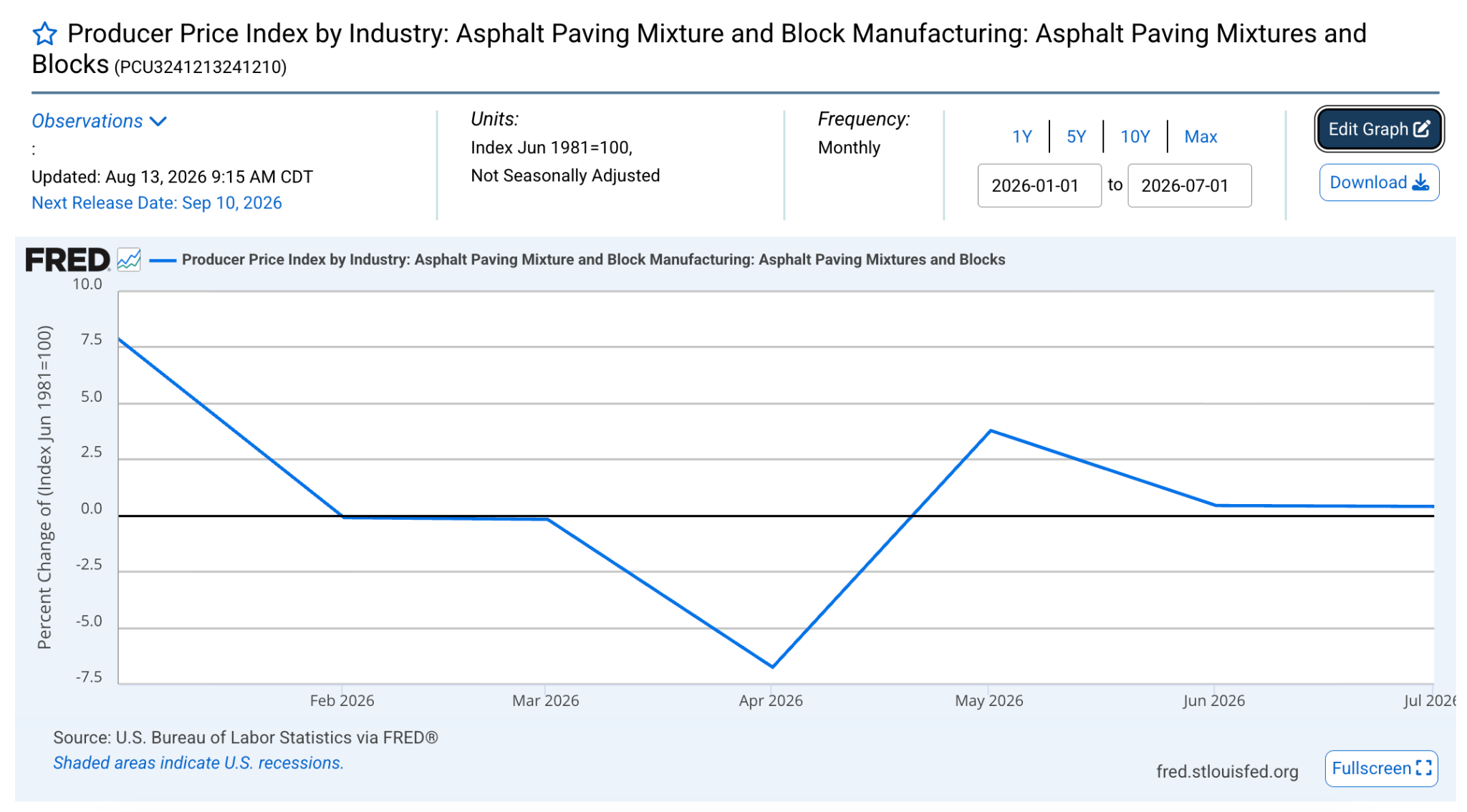
So, a price you locked in February can be wrong by the time you pave.
Pro tip: Compare ticket tonnage against the tonnage your foreman reported placing. A gap of a few tons a day points to yield loss, a mat running thick, or a truck that ended up somewhere else.
Step 5: Compare actual costs to the budget every week
Weekly comparison turns raw data into decisions, and it's the first step contractors drop when the season heats up. Pull actual labor, material, and equipment against budget for every open job, then read two numbers per cost code: dollars spent and percent complete.
Thin margins are the reason this matters. Construction businesses average net profit margins of 3–7%, so one job running 10% over budget can swallow the profit from two that came in clean.
The question worth asking every week is cost to complete. Burn 70% of your paving budget to place 45% of the tonnage, and the job has already told you how it ends. You still have room to adjust crew size, resequence phases, or open an honest scope conversation with the customer.
Pro tip: Run the review at the same hour every week with the same three people. Fifteen minutes on Monday morning beats a two-hour autopsy in November.
Step 6: Close the job out with a final cost report
A closeout report locks in what the job cost, and it takes about 20 minutes when you've kept up with steps 3 and 4, especially once your cost data lives in one connected system instead of scattered spreadsheets.
Total every cost code, compare it to budget, calculate the job's gross margin, and write down the two or three reasons the number landed where it did.
Then check your billing. Costs in excess of billings, which most contractors call underbilling, mean you've spent money you haven't invoiced, and it drains cash quietly all season. Bill the retainage, chase the open change orders, and close the file.
Pro tip: Put the closeout number in front of the estimator who bid the job, every single time. Estimators who see their own variance for a full season get sharper without anybody making a speech about accountability.
Step 7: Feed the numbers back into your next bid
Your job costing process pays for itself here, where last month's actuals become next month's production rates.
Update your rate library with real figures: tons per crew day by mix type, square yards of milling per hour, linear feet of striping per shift, and equipment hours per 1,000 tons, or gallons per square foot if you run a sealcoating business alongside paving.
Price the next job from the margin you need. Markup math fools plenty of contractors: a 20% markup on $100,000 of cost gives you a $120,000 price and a 16.7% margin, which is more than three points below what most people assume they're making. Set your target margin, work backward to the price, and defend it in the bid room.
Pro tip: Keep a running list of jobs you'd bid differently. Customer type, site access, night work, and haul distance explain most of the misses, and that list becomes your go/no-go filter for next season.
Common Mistakes to Avoid
- Pricing from markup: Markup percentages read higher than the margin they produce, so your planned profit shows up smaller on every invoice.
- Waiting on the invoice to learn the cost: Plant tickets and daily hours tell you today what an invoice confirms three weeks from now.
- Building cost codes nobody uses: Sixty codes produce guesses. Twelve produce data your estimator can bid with.
- Leaving equipment out of the math: Owned machines feel free and cost real money in fuel, wear parts, and operator hours.
- Treating change orders casually: A verbal scope change wrecks your baseline, and a wrecked baseline hides the overrun until closeout.
- Reviewing costs after the season: A variance you spot in November teaches you something in April. A variance you spot on Monday saves the job.
OneCrew Makes the Job Costing Process Easier
OneCrew is a platform built specifically for project-based asphalt and concrete paving contractors. It ties the whole job costing process together from the estimate baseline through field capture, billing, and the production rates that feed your next bid.
Here's what it covers:
- Build the estimate that becomes your cost budget at contract signing: OneCrew's estimating tools let you price jobs from PDFs or aerial maps with configurable calculators for labor, materials, equipment, and subs.
- Assign crews and hours to the phases you actually bid: OneCrew's scheduling feature ties crew assignments directly to specific job phases so the labor assumptions in your estimate match how the work gets deployed in the field.
- Capture field hours and job data as they happen, not Friday afternoon: OneCrew’s field management tools push mobile work orders to crew phones and pull time and job data back to the office in real time.
- Get proposals signed and change orders documented before the crew touches the scope: OneCrew's proposals feature generates branded proposals directly from your estimate, and stores signed approvals in the platform.
- Keep every customer and project history connected to your cost data: OneCrew's CRM tracks every lead, conversation, and past project in one place.
- Invoice from completed work and sync to QuickBooks without retyping anything: OneCrew's invoicing tools generate invoices from the line items already in the platform and sync invoicing and payment data with QuickBooks Online.
You only need one platform that ties the estimate, the field, and the invoice together so real costs land against the right budget lines from the first crew hour to the final payment. Book a free demo and see how it works for your operation.
FAQs
1. What is the job costing process in construction?
The job costing process in construction tracks every labor, material, equipment, and subcontractor dollar against a single job's budget. You set cost codes, build the budget from your estimate, record actual costs as the crew works, then compare the two to see the job's real margin.
2. How do you calculate job cost on a paving job?
Calculate job cost by adding burdened labor, material delivered to the site, equipment hours at your internal rate, subcontractor invoices, and direct job expenses like permits and traffic control. Divide gross profit by the contract amount, and you have the job's margin.
3. What is the difference between job costing and process costing?
The main difference between job costing and process costing is the unit you track. Job costing assigns costs to one identifiable project, which fits paving work priced job by job.
Process costing spreads costs across continuous, identical output, which fits a plant producing thousands of tons of the same mix.
4. How often should contractors review job costs?
Contractors should review job costs weekly on active jobs and again at closeout. Weekly reviews catch overruns while you can still change crew size or sequencing, and closeout reviews hand your estimator real production rates for the next bid.
5. Do you need a platform to run a job costing process?
No, you can run a job costing process on paper and a spreadsheet, and plenty of contractors do it well for years. A purpose-built platform removes the double entry and the lag, because field hours, plant tickets, and invoices all land against the same cost codes without anyone retyping them.

.png)