
Streamline your paving business with the right CRM

Most commercial paving contractors running $5M to $25M in annual revenue have already invested in some form of CRM software. Yet a surprising number still rely on spreadsheets to track leads, sticky notes to manage follow-ups, and phone calls to confirm scheduling. The problem isn’t a lack of technology. It’s that the technology doesn’t fit. Generic CRM platforms were built for sales teams selling software subscriptions or insurance policies, not for contractors managing inbound calls, site walks, asphalt bids, and crew scheduling all at once. This guide breaks down why that gap exists, what purpose-built paving CRMs actually offer, and how to choose the right solution for your operation.
Key Takeaways
-
Specialized beats generic. Paving CRMs are better aligned with the real workflows and needs of commercial paving contractors than generic CRMs.
-
Workflow fit is critical. Choosing a CRM should focus on how well it matches your processes and team, not just price or features.
-
Evaluate for ROI. Assess CRM value by looking for measurable gains in efficiency, close rates, and lost lead reduction.
-
Avoid common pitfalls. Teams that embrace training, keep data clean, and tie the CRM to core operations see the biggest wins.
Why traditional CRMs fall short for paving contractors
The paving sales process doesn’t look like a typical B2B sales funnel. A prospect calls your office on a Tuesday morning, wants a quote by Friday, and expects a crew on-site within two weeks. That sequence moves fast, involves multiple people, and relies heavily on phone-based communication rather than email sequences or contact forms.
Generic CRM platforms are optimized for the opposite scenario. They shine at tracking long sales cycles, managing email campaigns, and logging touchpoints across months of nurturing. When you try to map a paving workflow onto those structures, things break down quickly. Managing paving leads through a system built for software sales means creating manual workarounds at almost every step.
Here’s where the friction shows up most:
-
Estimate follow-up: Automating a follow-up sequence tied to a specific bid amount and job type requires significant setup in most general platforms.
-
Site walk scheduling: Booking a site assessment inside a CRM that wasn’t designed for field scheduling creates double-entry and missed appointments.
-
Payment collection: Most generic CRMs don’t connect invoicing and payment to the job record without a third-party integration.
The cost adds up too. Contractors end up paying for a general platform, then purchasing add-ons or integrations to fill the gaps, then spending hours training staff on workarounds. As feature-rich general CRMs show, configuring them correctly for trade-specific lead-to-bid workflows is possible but rarely simple. The result is a system that technically works but never quite fits the way your team actually operates.
What makes a paving CRM different?
A paving-specific CRM is built around one workflow: a prospect contacts you, you estimate the job, you win it, you schedule it, you complete it, you collect payment, and you ask for a review. Every feature in the platform supports one of those steps. Nothing is bolted on.
Specialized paving CRMs tie features directly to this single workflow, which matters most for small to mid-sized teams that depend on inbound calls and don’t have a dedicated sales department managing every touchpoint manually.
The core capabilities that set paving CRMs apart include:
-
Automatic lead capture from phone calls and web forms
-
Templated follow-up sequences tied to estimate status
-
Scheduling tools that connect directly to job records
-
Invoicing and payment collection within the same platform
-
Automated review requests sent after job completion
Here’s how generic vs. paving-specific CRMs stack up:
-
Inbound call tracking. Generic platforms handle it manually or through an add-on. Paving-specific CRMs build it in.
-
Estimate follow-up automation. Generic CRMs require configuration. Paving-specific platforms ship with a pre-built workflow.
-
Field scheduling. Generic CRMs don’t include it. Paving-specific platforms treat it as a core feature.
-
Payment collection. Generic CRMs rely on third-party integrations. Paving-specific CRMs handle it natively or through tight integration.
-
Review request automation. Generic CRMs rarely include it. Paving-specific platforms make it standard.
-
Trade-specific reporting. Generic CRMs give you generic dashboards. Paving-specific platforms surface job-level and revenue metrics.
Understanding the asphalt paving software benefits of purpose-built platforms helps clarify why contractors who switch from generic tools report faster follow-up times and fewer lost leads almost immediately.
Pro Tip: When evaluating top paving CRM software, prioritize platforms that connect directly to your estimating and scheduling tools. A CRM that lives in isolation from your project data creates the same information silos you’re trying to eliminate.
How to evaluate and select the best paving CRM
Choosing a CRM is a process decision before it’s a software decision. The biggest mistake contractors make is evaluating platforms based on feature lists rather than workflow fit. A tool with 200 features you don’t use is less valuable than a simpler tool that maps perfectly to how your team works.
Here’s a practical framework for making the right call:
-
Audit your current workflow. Map every step from first contact to final payment. Identify where leads get dropped, where follow-ups fail, and where your team spends the most manual time.
-
List your must-have features. Based on your audit, identify the five or six capabilities that would eliminate your biggest pain points. Don’t get distracted by features you might use someday.
-
Run a real-world trial. Take a live lead through the entire system during your trial period. Don’t just click through demos. Put real data in and see where it breaks.
-
Calculate your payback period. Estimate how much time the platform saves per week, multiply by your hourly labor cost, and compare to the subscription price. Most contractors recover the cost within the first quarter.
-
Check references from similar contractors. Ask specifically about onboarding, support response times, and whether the platform handled their volume without issues.
As CRM selection experts note, this is a fit-before-implementation decision, not just a pricing decision. Getting that sequence right saves you from a costly switch six months later.
Here’s where the RoI actually shows up:
-
Time saved. Roughly 75% reduction in estimates.
-
Leads closed from better tracking. 45k projects have been sold with OneCrew.
-
Higher volume of proposals. $8B+ projects have been proposed in OneCrew…
Pro Tip: Involve your estimator or office manager in short-list demos. They’ll spot workflow mismatches that won’t show up in a sales presentation. Also review asphalt bidding tools and paving scheduling software in parallel to ensure your CRM can connect to those systems.
Biggest wins and common pitfalls with paving CRMs
When paving contractors implement the right CRM correctly, the results show up fast and in predictable places.
The biggest wins contractors report:
-
Faster follow-up times
-
Higher close rates because no estimate goes without a structured follow-up sequence
-
Fewer lost jobs from scheduling miscommunication between office and field
-
Better online reputation from automated review requests sent at the right moment
Specialized paving CRMs automate tasks like follow-up, scheduling, and review requests for mid-sized teams, which means your office staff spends less time chasing leads and more time converting them.
Common pitfalls to avoid:
-
Under-utilizing features: Contractors often activate a CRM but only use 20% of its capabilities, negating most of the ROI.
-
Skipping team training: If your crew or office staff don’t trust the system, they’ll work around it, and you’ll end up with two parallel processes.
-
Failing to integrate: A CRM that doesn’t connect to your estimating or scheduling tools creates data gaps that slow you down. Explore automation for paving contractors to understand what’s possible when systems talk to each other.
Pro Tip: Assign a CRM champion on your team, someone who owns data quality, monitors usage, and flags when the workflow breaks down. This single step dramatically improves adoption rates.
What most paving contractors get wrong with CRMs
Here’s the honest take: the risk isn’t picking a bad CRM. Plenty of decent platforms exist. The real risk is picking a capable tool that’s a poor fit for your team’s process discipline.
Most CRM failures in paving come down to one thing: contractors buy the software but don’t change the behavior. The CRM becomes a digital filing cabinet instead of an active workflow engine. Leads get entered but not followed up. Estimates get logged but not tracked. The platform sits there looking impressive while the actual work still happens in text messages and phone calls.
The other overlooked factor is training. Not a one-time onboarding session, but ongoing reinforcement of how the system should be used. Your team needs to understand why the workflow matters, not just how to click the buttons.
Success with a paving CRM comes from aligning the tool to your core business KPIs: lead response time, estimate close rate, days to first invoice, and review volume. When your CRM is configured to move those numbers, every feature has a purpose. Before committing, it’s worth reviewing Procore CRM fit and similar evaluations to understand how different platforms handle real paving workflows. As industry analysts confirm, fit before implementation is the decision that determines whether your investment pays off.
Tools that power efficient paving operations
If you’re evaluating a CRM upgrade, the most effective approach is to look at your entire operations stack at once. A CRM that connects to your estimating, scheduling, and field management tools creates a single source of truth for every job.
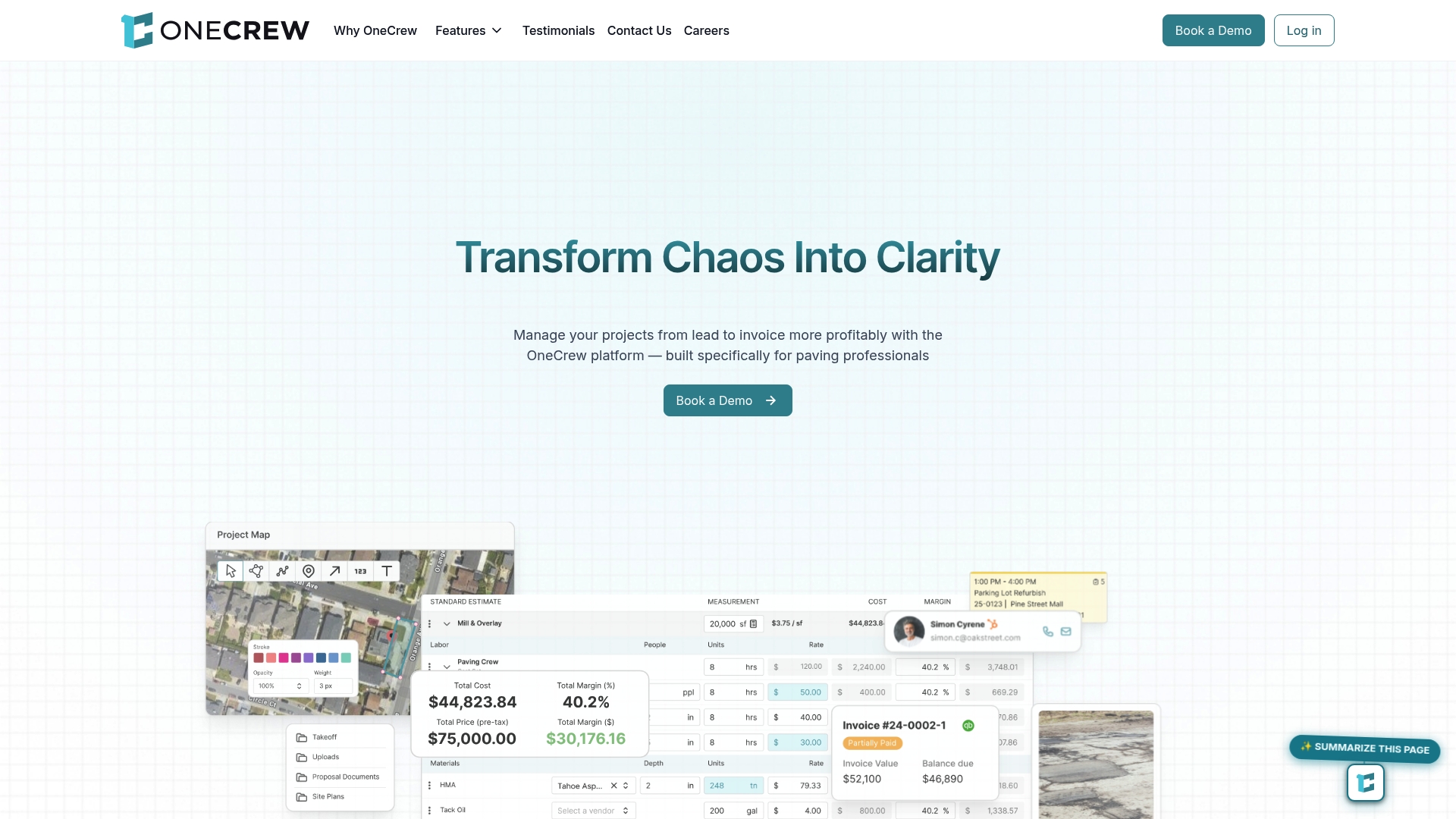
OneCrew is built specifically for paving contractors who need more than a contact database. The platform’s paving estimating tools generate accurate bids faster, while drag-and-drop scheduling keeps your crews organized without the back-and-forth. The field management app connects your office and field teams in real time, so nothing falls through the cracks between estimate and completion. If your current tools aren’t working together, OneCrew is worth a closer look.
Frequently asked questions
What is the main benefit of a paving CRM versus a generic CRM?
A paving CRM streamlines jobs from lead to payment with workflows built specifically for paving contractors, eliminating the manual workarounds that generic platforms require. Specialized paving CRMs automate follow-up, scheduling, and review requests in one connected system.
Can a paving CRM handle estimating and scheduling?
Most paving CRMs handle lead-to-job tracking and automate parts of scheduling, but complex estimating is typically managed in dedicated tools. Specialized paving CRMs are not positioned as a full estimating or project management suite, so integrations matter.
What size paving companies see the biggest impact from specialized CRMs?
Small to mid-sized paving contractors who rely on inbound calls and need efficient, consistent workflow benefit most. Specialized paving CRMs are designed for teams that can’t afford to have a dedicated sales department managing every touchpoint manually.
Is CRM price or fit more important when choosing a system?
Fit to your existing workflows and team discipline matters more than price when selecting a CRM. As industry guidance confirms, this is a fit-before-implementation decision, and getting it wrong costs far more than any subscription fee.

